Laravel PHP Licenser & Updates Manager - REST API, webhooks, customer portal
Instagram Feed For Botble CMS By Viral Addons
Plugin
📸 Instagram Feed for Botble CMS By Viral Addons
Display your Instagram content beautifully on your Botble website. Fully responsive, customizable, and easy to use.
🔥 Features at a Glance
Transform your website with a stunning Instagram feed that keeps your content fresh and engaging.
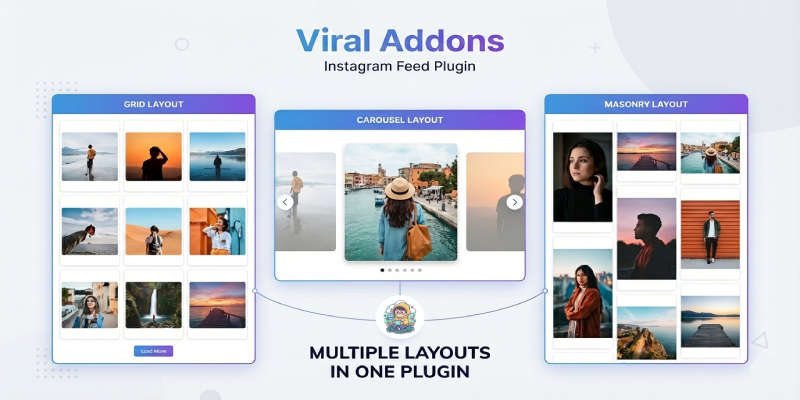
- Multiple Layouts: Choose from Grid, Masonry, or a sleek Carousel slider.
- Fully Responsive: Looks amazing on Desktops, Tablets, and Mobile devices.
- Smart Responsiveness: enhancing user experience on all screen sizes.
- Mobile-First Design: Automatically converts Grid/Masonry to a touch-friendly slider on mobile (optional).
- Custom Breakpoints: Set different column counts for Desktop, Tablet, and Mobile.
- Multiple Instagram Accounts Support: Create unlimited feeds from different Instagram accounts and display them anywhere on your site.
- Dual Feed Modes:
- Instagram API: Automatically fetch your latest posts using your Instagram Basic Display API Access Token.
- Manual Mode: Manually upload images if you don't have an API token or want to curate a specific look.
- Premium Popups (Lightboxes):
- Zero Redirection: Users view images and play videos directly in a beautiful, responsive popup modal without leaving your site.
- Video Support: Seamlessly plays Instagram videos within the modal.
- Engagement Boosters:
- "Load More" Button: Let users explore more of your content without overwhelming the page.
- Profile Header: Display your profile picture, username, verified badge, and stats (Posts, Followers, Following).
- Call to Action: Link directly to your Instagram profile to grow your following.
- Performance Optimized: Lazy loading and optimized assets ensure your site stays fast.
- Easy Integration: Works with Shortcodes (
[instagram-feed]) and integrates seamlessly with Botble's UI blocks and theme.
🚀 Installation Guide
- Download: Get the
instagramfeedplugin zip file. - Upload: Extract the contents to
platform/plugins/instagramfeed. - Activate: Go to Admin Panel -> Plugins and activate "Instagram Feed".
- Clear Cache: Go to Platform Administration -> Tools -> Clear Cache to ensure all assets are loaded correctly.
⚙️ Configuration & Usage
1. Create a Feed
- Navigate to Admin Panel -> Instagram Feed -> Feeds.
- Click Create.
- Feed Type:
- Select Instagram API to fetch posts automatically (requires Access Token).
- Select Manual Upload to upload specific images/videos from your computer.
- Layout Settings:
- Choose your preferred layout: Grid, Carousel, or Masonry.
- Adjust columns for Desktop, Tablet, and Mobile.
- Toggle "Convert to Slider on Mobile" for a better mobile experience.
- Save your feed.
2. Display the Feed (Shortcode)
You can display your feed anywhere on your site using the shortcode.
Basic Usage:
[instagram-feed id="1"]
Replace 1 with the ID of your created feed.
Add to a Page:
- Go to Pages and edit the page where you want the feed.
- Paste the shortcode
[instagram-feed id="X"]into the content editor. - Update the page.
3. Use with Page Builder (UI Blocks)
If your theme uses the Botble Page Builder, integration is even easier.
- Edit any page in the Admin Panel.
- Switch to the Page Builder mode.
- Look for the "Instagram Feed" block or search for it.
- Click Use to add it to your layout.
- Select your feed from the dropdown options.
- Save and Publish.
4. Get Your Access Token (For API Mode)
To get an Instagram access token, register an app on the Meta for Developers platform, add the Instagram Graph API or Basic Display API product, and use the user token generator to authorize your account. A professional (business or creator) account is required to generate this token for API access.
Steps to Get an Instagram Access Token:
- Register as a Developer: Go to Meta for Developers and create an account.
- Create an App: In the developer dashboard, create a new app and select "Other" or an appropriate type, then add the Instagram Basic Display or Instagram Graph API product.
- Configure Instagram Product: Navigate to the Instagram section, click "Basic Display" and create a new app. Add your website URL in the required fields.
- Add Instagram Testers: Go to Roles > Roles and add your Instagram account username as a tester.
- Accept Tester Invite: Log in to your Instagram account, go to Settings > Apps and Websites > Tester Invites, and accept the invitation.
- Generate Token: Return to the Meta Developer dashboard, navigate back to the Instagram API section, and click "Generate Token" under the "User Token Generator" field.
- Authorize: Log in with your Instagram credentials and authorize the app to generate the access token.
🆘 Support
If you encounter any issues or have questions, please feel free to reach out.
- Support Email: [email protected]
📝 Changelog
Version 1.0.2
- NEW: Added Customizable Aspect Ratio support for images and videos.
- FIX: Resolved carousel and responsive layout issues.
Version 1.0.1
Made with ❤️ for Botble CMS By Viral Addons.
Support the Author
If you find this product helpful, consider supporting the developer.
Scan QR Code
Leave a comment
Your email address will not be published. Required fields are marked *