Laravel PHP Licenser & Updates Manager - REST API, webhooks, customer portal

SH Variation Maestro
PluginSH Variation Maestro
Bulk product variation generator with dynamic SKU and image assignment for fashion products.
Works with Botble CMS eCommerce plugin. No core file modification required.
Installation
- Copy the
sh-variation-maestrofolder into your Botble project'splatform/plugins/directory. - Go to Admin Panel → Plugins.
- Find SH Variation Maestro and click Activate.
How to Use
Step 1: Create or Edit a Product
Go to Products → Edit an existing product (the product must be saved first).
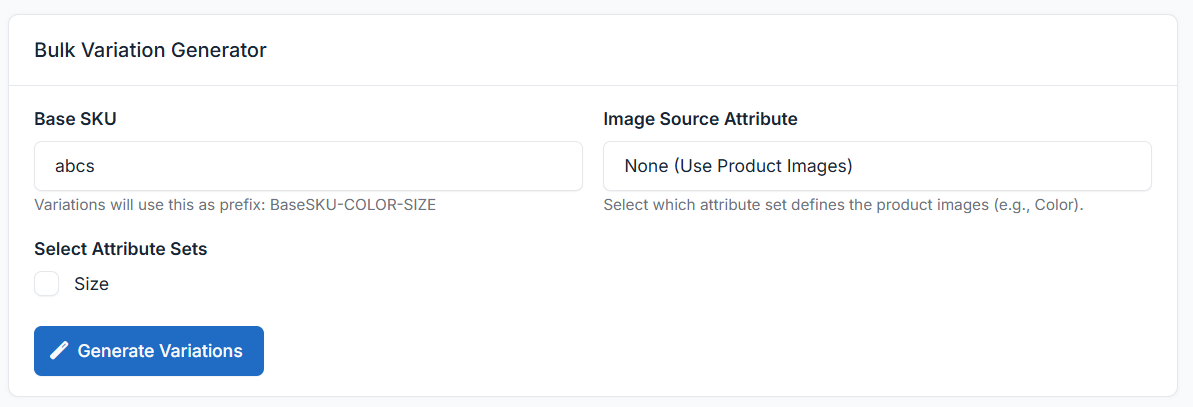
You will see a new meta box titled "Bulk Variation Generator" on the product edit page.
Step 2: Set Base SKU
Enter your Base SKU in the input field. This will be used as the prefix for all generated variation SKUs.
Example:
- Base SKU:
TD20ARN2 - Generated SKUs:
TD20ARN2-RED-S,TD20ARN2-RED-M,TD20ARN2-BLUE-L, etc.
If left empty, the product's existing SKU will be used as the base.
Step 3: Select Attribute Sets
Check the attribute sets you want to combine (e.g., Color, Size).
Once checked, a multi-select dropdown will appear for each set. Pick the specific values you want:
| Attribute Set | Selected Values |
|---|---|
| Color | Red, Blue, Navy, Green |
| Size | S, M, L, XL, XXL |
Click the "All" button next to any set to quickly select all its values.
A live counter will show how many variations will be generated (e.g., "Will generate 20 variations").
Step 4: Assign Images (Optional)
- From the "Image Source Attribute" dropdown, select which attribute set defines images (typically Color).
- Image cards will appear for each selected value.
- Click on a card to open the Media Manager and assign a specific image.
Example:
| Color | Image |
|---|---|
| Red | red-tshirt.jpg |
| Blue | blue-tshirt.jpg |
| Navy | navy-tshirt.jpg |
Variations will inherit the image of their matching color attribute.
Step 5: Generate
Click "Generate Variations".
- The plugin will create all combinations via AJAX (no page reload during generation).
- Duplicate combinations are automatically skipped.
- The page will reload after generation to show the new variations in the standard Botble variations table.
Example
Input:
- Product: Premium Cotton T-Shirt
- Base SKU:
TD20ARN2 - Colors: Red, Blue, Navy (3)
- Sizes: S, M, L, XL, XXL (5)
Output: 15 variations
| # | SKU | Variation |
|---|---|---|
| 1 | TD20ARN2-RED-S |
Premium Cotton T-Shirt |
| 2 | TD20ARN2-RED-M |
Premium Cotton T-Shirt |
| 3 | TD20ARN2-RED-L |
Premium Cotton T-Shirt |
| 4 | TD20ARN2-RED-XL |
Premium Cotton T-Shirt |
| 5 | TD20ARN2-RED-XXL |
Premium Cotton T-Shirt |
| 6 | TD20ARN2-BLUE-S |
Premium Cotton T-Shirt |
| 7 | TD20ARN2-BLUE-M |
Premium Cotton T-Shirt |
| ... | ... | ... |
| 15 | TD20ARN2-NAVY-XXL |
Premium Cotton T-Shirt |
Each variation inherits the parent product's price, weight, dimensions, stock settings, and status.
Important Notes
- Save the product first — The generator only works on the Edit page (not Create).
- Duplicates are skipped — Running the generator again with the same attributes won't create duplicates.
- Variations can be edited individually — After generation, use the standard Botble variations table to edit prices, stock, images, etc. for each variation.
- Large batches supported — The generator handles 100+ combinations efficiently via optimized database queries.
Requirements
- Botble CMS v7.3.0+
- Ecommerce plugin (activated)
- Product attribute sets must be created first (Admin → Ecommerce → Product Attributes)
Leave a comment
Your email address will not be published. Required fields are marked *