Laravel PHP Licenser & Updates Manager - REST API, webhooks, customer portal

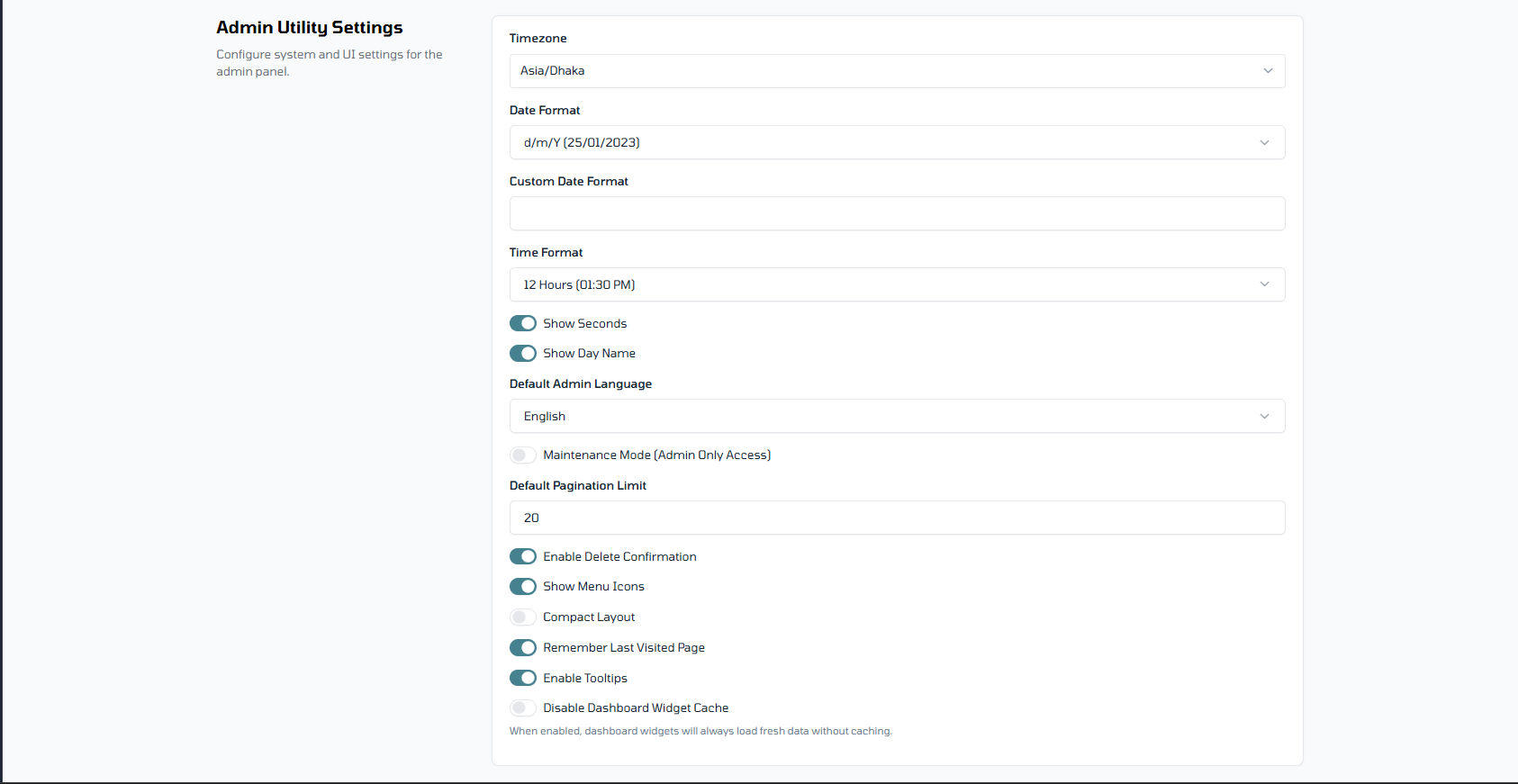
Admin Utility Settings
PluginAdmin Utility Settings for Botble CMS
Managing a Botble site often means clicking through half a dozen menus just to change one small setting. I built this plugin to fix that.
Admin Utility Settings brings all those scattered, system-wide configurations—like date formats, timezones, and UI tweaks—into one single, organized dashboard. It’s designed to save you time and keep your admin panel clean.
Why use this?
The main goal here is efficiency. Instead of hunting for where Botble hides a specific utility setting, you have a central hub. It’s perfect for developers who want a cleaner hand-off to clients, or for admins who just want to get things done faster.
What’s included
- Date & Time: Change your system-wide date and time formats in one place without digging through core files or multiple settings pages.
- UI Tweaks: Simple toggles and fields to adjust the admin panel's look and feel.
- System Utilities: Quick access to the little utility settings that usually feel "lost" in the default menu structure.
- One Dashboard: Everything is grouped into logical tabs (General, Date/Time, Advanced) so you never have to search for them again.
Requirements
- Botble Core: v7.0.0 or higher
- PHP: 8.1+
How to get started
It's a standard Botble plugin installation:
- Upload: Either upload the folder to
platform/plugins/admin-utility-settingsvia FTP or use the Plugins -> Add New menu in your admin panel. - Activate: Go to Plugins and click Activate on "Admin Utility Settings".
- Configure: You'll find the new settings under Settings -> Utility Settings.
- Save: Just tweak what you need and hit save—the changes apply immediately across your site.
Settings Explained
Here is what every option in the Utility Settings menu does:
🗓️ Date & Time
- Timezone: Sets the system-wide timezone for your site.
- Date Format: Choose how dates appear (e.g., 2023-01-25). Select "Custom" to enter your own PHP date format.
- Time Format: Switch between 12-hour (AM/PM) and 24-hour formats.
- Show Seconds: Adds seconds to the time display.
- Show Day Name: Includes the name of the day (e.g., Monday).
🖥️ System
- Default Admin Language: Sets the primary language for the admin interface.
- Maintenance Mode: Restricts site access to admins only.
- Default Pagination Limit: Sets the number of rows shown in admin tables by default.
- Enable Delete Confirmation: Toggles the "Are you sure?" popup when deleting items.
🎨 UI/UX
- Show Menu Icons: Toggles the small icons in the sidebar menu.
- Compact Layout: Switches to a tighter, more space-efficient admin design.
- Remember Last Visited Page: Automatically redirects you to your last page upon login.
- Enable Tooltips: Turns on helpful hover-text hints throughout the panel.
- Disable Dashboard Widget Cache: Forces dashboard stats to reload fresh every time (disables caching).
Support & Feedback
If something isn't working or you have an idea for a feature, feel free to reach out. I'm always looking to make this more useful.
- Email: [email protected]
- Website: shakib.me
Leave a comment
Your email address will not be published. Required fields are marked *