Laravel PHP Licenser & Updates Manager - REST API, webhooks, customer portal
Wholesale (B2B) For Botble Marketplace (Single and multivendor, Auto Lang translation, Variations)
PluginWholesale (B2B) Plugin
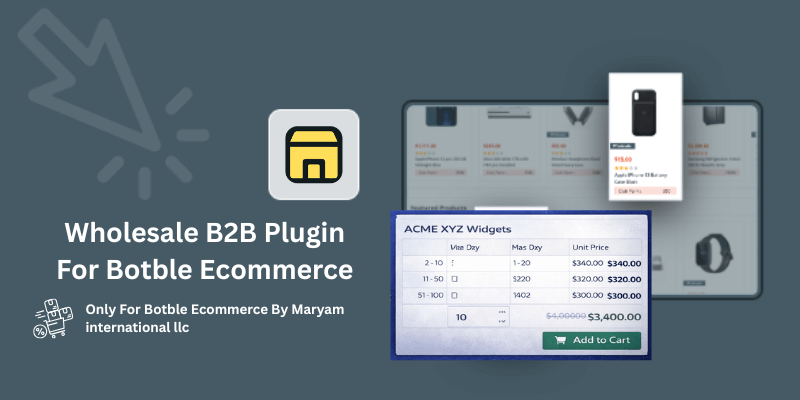
Add wholesale pricing tiers to products for B2B customers. Set quantity-based pricing with min/max ranges.
Features
- Admin Menu: Dedicated "Wholesale Products" menu under eCommerce with tabs for Inhouse and Seller products
- Product Form Integration: Add up to 6 wholesale price tiers per product with min qty, max qty, and price
- Vendor/Seller Support: Marketplace vendors can set their own wholesale prices from their dashboard
- Frontend Display: Shows wholesale price table on product details page (positioned before quantity selector)
- Dynamic Price Update: Real-time AJAX price update when customer changes quantity
- Cart & Checkout Pricing: Automatically applies wholesale price throughout cart and checkout
- Cache Clearing: Automatic cache clearing on plugin activate/deactivate/remove
Installation
- Upload the
wholesalefolder toplatform/plugins/ - Go to Admin → Plugins and activate "Wholesale (B2B)"
- Navigate to eCommerce → Wholesale Products to manage products
Usage
For Admin - Setting Wholesale Prices
- Go to Products → Edit any product
- Find the "Wholesale Prices" section in the product form
- Add price tiers:
- Min Qty: Minimum quantity for this price tier
- Max Qty: Maximum quantity for this price tier
- Price: Unit price for this quantity range
- Click "Add More" to add additional tiers (up to 6)
- Save the product
For Vendors/Sellers - Setting Wholesale Prices
- Go to Vendor Dashboard → Products → Edit any product
- Find the "Wholesale Prices" section in the product form
- Add price tiers with min qty, max qty, and price
- Click "Add More" to add additional tiers (up to 6)
- Save the product
Example Pricing Tiers
| Min Qty | Max Qty | Unit Price |
|---|---|---|
| 2 | 10 | $340.00 |
| 11 | 50 | $320.00 |
| 51 | 100 | $300.00 |
How Variations Work
Example: T-Shirt with Size variations (S, M, L, XL)
| Product | Regular Price | Wholesale (2-10 pcs) |
|---|---|---|
| T-Shirt Size S | $11 | $10 |
| T-Shirt Size M | $13 | $12 |
| T-Shirt Size L | $16 | $15 |
| T-Shirt Size XL | $18 | $16 |
For Admin/Seller - Setting Variation Wholesale Prices:
- Go to Products → Edit your product (e.g., T-Shirt)
- Scroll to Variations section
- Click "Edit" on each variation (Size S, Size M, etc.)
- In the variation edit form, find "Wholesale Prices" section
- Add price tiers for that specific variation
- Save the variation
- Repeat for each variation that needs different wholesale prices
Option A: Same wholesale prices for all variations
- Set wholesale prices on the parent product only
- All variations will inherit the parent's wholesale prices
Option B: Different wholesale prices per variation
- Set wholesale prices on each variation individually
- Each variation can have its own pricing tiers
For Customers:
- Customer views product page (e.g., T-Shirt)
- Customer selects a variation (e.g., Size M)
- Wholesale price table updates automatically via AJAX
- Customer sees: "2-10 pcs = $12 each"
- Customer changes quantity to 10
- Price updates: "$12 x 10 = $120"
- Customer adds to cart → wholesale price applied
How It Works
- Product Page: Customer views product and sees wholesale price table before quantity selector
- Variation Change: When customer selects a different variation, wholesale prices update via AJAX
- Quantity Change: When customer changes quantity, price updates dynamically
- Active Tier Highlight: The matching price tier is highlighted with calculation shown (e.g., "12.00 x 10 = 120.00")
- Cart: Wholesale price is applied when adding to cart
- Checkout: Total reflects wholesale pricing throughout the checkout process
Admin Wholesale Products List
- Inhouse Products Tab: View all your own products with wholesale prices
- Seller Products Tab: View all seller products with wholesale prices (marketplace)
- Edit Button: Quick access to edit product and modify wholesale prices
Theme Compatibility
The plugin is compatible with the Shofy theme and other themes. It uses the following selectors:
- Quantity wrapper:
.tp-product-details-action-wrapper - Quantity input:
.tp-cart-input - Quantity buttons:
.tp-cart-minus,.tp-cart-plus - Price display:
.tp-product-details-price.new-price
Requirements
- Botble CMS 7.3.0 or higher
- eCommerce plugin
- Marketplace plugin (optional, for vendor/seller products)
Changelog
Version 1.1.0 (January 31, 2026)
NEW: Full Product Variation Support
Wholesale pricing now fully supports product variations (Size, Color, etc.)
Each variation can have its own wholesale prices or inherit from the parent product
Wholesale prices update instantly when a variation is selected (no delay)
Automatically fetches prices on page load if a variation is pre-selected
Works seamlessly with Nest and Shofy themes
Cart and checkout correctly apply variation-specific wholesale prices
NEW: Variation Edit Form Integration (Admin & Seller)
Wholesale pricing section added directly inside the variation edit modal
Admin/Sellers can define different wholesale tiers per variation
Prices set on parent product act as fallback when variation prices are missing
AJAX-based saving for variation wholesale prices with correct admin prefix
Info notice added in admin product form guiding users to set variation prices
Improved: Instant Wholesale Price Detection
Uses multiple detection methods for reliability:
onChangeSwatchesSuccess callback
jQuery ajaxComplete
Input value interception
Tracks last selected variation to prevent duplicate API requests
Wholesale table updates immediately, just like the main product price
Improved: Frontend Wholesale Table Rendering
Wholesale table now displays even if only variations have prices (no parent price)
Automatically detects if any variation contains wholesale pricing
Displays a helpful message: “Select a variation to see wholesale prices” when required
Table container renders dynamically and updates on variation change
NEW: Auto Language & Localization Support
Automatically detects active language from Botble locale settings
No manual configuration required
Text labels (Min Qty, Max Qty, Unit Price, etc.) auto-translate based on site language
Number formats auto-localize (English 0–9, Arabic ٠١٢, Hindi ०१२, etc.)
Improved: Currency Handling
Currency symbol is automatically detected from eCommerce settings
Currency symbol now displays correctly across:
Wholesale tables
Product forms
Variation edit modals
Improved: Responsive Design & Styling
Fixed mobile and tablet responsiveness
Wholesale table uses consistent column layout across all devices
Refactored table styling to use proper CSS classes
Improved font sizes, padding, and fixed table layout for better readability
Removed: Manual Settings Page
Separate settings page removed
Plugin now works out of the box using system language and currency settings
Version 1.0.2
- Added separate language settings for Text and Numbers
- Currency symbol automatically detected from eCommerce settings
- Fixed mobile responsiveness
- Improved table styling
Version 1.0.0 (Initial Release)
- Initial release with wholesale pricing tiers functionality
- Admin menu for managing wholesale products
- Product form integration for setting price tiers
- Vendor/Seller support for marketplace
- Frontend display with dynamic price updates
- Cart and checkout pricing integration
Author
Maryam International LLC - https://maryams.ae Email - [email protected] Whatsapp - +971553682656
Support the Author
If you find this product helpful, consider supporting the developer.
Bank Information
Bank Name- Wio Bank IBAN: AE040860000009582249758 ACCOUNT NUMBER: 9582249758 ACCOUNT NAME: MARYAM INTERNATIONAL LLC, Country United Arab Emirates
PayPal
@MohammadAqib951Scan QR Code

Leave a comment
Your email address will not be published. Required fields are marked *