Laravel PHP Licenser & Updates Manager - REST API, webhooks, customer portal
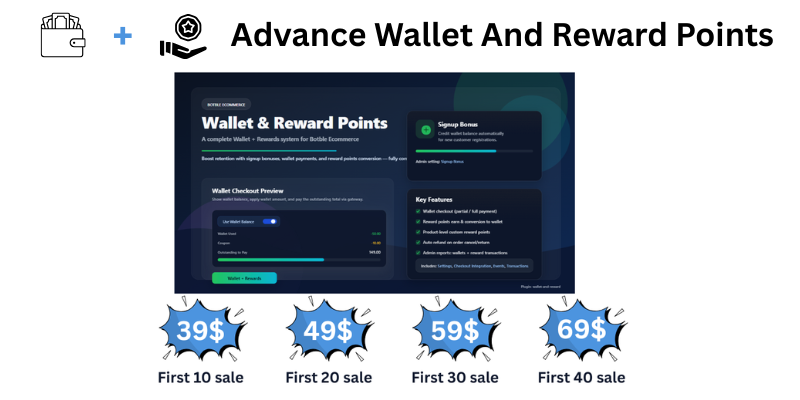
Advance Wallet and Reward
PluginWallet & Reward Points Plugin for Botble CMS
A comprehensive digital wallet and reward points system for Botble eCommerce. Enable customers to pay using wallet balance, earn reward points on purchases, and convert points to wallet credit.
🌟 Key Features
💰 Digital Wallet System
- Wallet Balance Management - Each customer gets a digital wallet
- Signup Bonus - Automatically credit new customers with configurable bonus amount
- Wallet Payments - Use wallet balance at checkout to pay for orders
- Transaction History - Complete history of all wallet credits and debits
- Admin Control - Admin can manually credit or debit any customer's wallet
🎁 Reward Points System
- Earn Points on Purchase - Customers earn points when orders are delivered
- Configurable Earning Rate - Set how many points per currency spent
- Convert to Wallet - Convert earned points to wallet balance
- Minimum Conversion Threshold - Set minimum points required before conversion
- Product-Specific Rewards - Set custom reward points for individual products
🛒 Checkout Integration
- Seamless Wallet Option - Wallet payment option appears at checkout
- Partial Payments - Use wallet for partial payment, pay remaining via other methods
- Real-time Calculation - Outstanding amount updates automatically
- Max Wallet Limit - Configure maximum wallet usage percentage per order
🔄 Order Lifecycle Management
- Points on Delivery - Reward points credited only when order is delivered
- Cancel Reversal - Wallet and points automatically reverted if order cancelled
- Refund Handling - Proportional reversal on order returns/refunds
📋 Admin Panel Features
1. Dashboard & Settings
Location: Admin → Wallet & Reward → Settings
| Setting | Description |
|---|---|
| Store Mode | Single Vendor or Multi-Vendor Marketplace support |
| Signup Bonus | Amount credited to new customer wallets (set 0 to disable) |
| Max Wallet % Per Order | Limit wallet usage to X% of order total |
| Points Per Currency | How many points earned per currency spent |
| Currency Per Point | Conversion rate when redeeming points |
| Min Points to Convert | Minimum points required before conversion allowed |
2. Wallet Management
Location: Admin → Wallet & Reward → Wallets
- View all customers with their wallet balances
- Search customers by name or email
- Click "Manage Wallet" to:
- View current balance
- Credit funds (add money with description)
- Debit funds (remove money with description)
- View complete transaction history
3. Reward Points Management
Location: Admin → Wallet & Reward → Reward Points
- View all customers with their reward point balances
- Add or remove points manually
- View all point transactions
4. Transaction History
Location: Admin → Wallet & Reward → Transactions
- Wallet Transactions - All wallet credits/debits across all customers
- Reward Transactions - All point earnings/redemptions across all customers
- Filter and search capabilities
- Export-ready data
5. Product Rewards
Location: Admin → Wallet & Reward → Product Rewards
- Set custom reward points for specific products
- Override the default points-per-currency calculation
- Great for promotional products or special offers
👤 Customer Features
1. Wallet & Rewards Dashboard
Location: Customer Account → Wallet & Rewards
Customers see a beautiful dashboard with:
Summary Cards
- Wallet Balance - Current available balance with currency
- Reward Points - Total earned points available
- Convert Rewards - Quick conversion form
Transaction History
-
Wallet Transactions Tab
- Date & Time
- Transaction Type (Credit/Debit)
- Amount
- Description (e.g., "Used for order #1234")
- Balance After Transaction
-
Reward Transactions Tab
- Date & Time
- Type (Earned/Converted/Deducted)
- Points (+/-)
- Description
- Points Balance After
Pagination
- Shows 5 transactions per page
- Previous/Next navigation
- Page counter (Page X of Y)
2. Convert Reward Points
From the dashboard, customers can:
- Enter number of points to convert
- See real-time calculation of wallet value
- Click "Convert" to transfer to wallet
- Minimum points requirement enforced
3. Checkout Experience
When customer proceeds to checkout:
- Wallet Option Appears - If customer has wallet balance
- Shows Available Balance - Current wallet balance displayed
- Use Wallet Checkbox - Toggle to apply wallet
- Amount Applied - Shows how much wallet will be used
- Outstanding Amount - Shows remaining amount to pay
- Payment Method - Select payment method for outstanding amount
- Dynamic Updates - All amounts update in real-time
Checkout Flow Example:
Order Total:        100.00 AED
Wallet Balance:      30.00 AED
☑ Use Wallet:       -30.00 AED
─────────────────────────────
Outstanding:         70.00 AED → Pay via Card/COD
🔄 Complete Order Lifecycle
Order Placed
- Customer places order using wallet (partial/full)
- Wallet amount is reserved (pending debit)
- Remaining amount charged via payment gateway
Order Confirmed
- Wallet amount is debited from customer wallet
- Transaction recorded with order reference
Order Delivered
- Shipping status changes to "Delivered"
- Reward points automatically credited to customer
- Points calculated based on order amount and settings
- Transaction recorded with order reference
Order Cancelled
- Admin or customer cancels order
- Wallet amount automatically refunded
- Reward points (if earned) automatically removed
- Refund transactions recorded
Order Returned
- Customer initiates return
- Proportional wallet refund calculated
- Proportional points removal calculated
- Transactions recorded
🎨 Frontend Display
Product Cards
- Shows "Earn X Points" badge on product cards
- Eye-catching orange color with gift icon
- Points calculated based on product price
Product Detail Page
- "Earn X Reward Points" message displayed
- Shows under product price
- Encourages purchase motivation
Thank You Page
- Wallet payment breakdown displayed
- Shows amount paid via wallet
- Shows outstanding amount paid via other method
Customer Order View
- Wallet usage displayed in order details
- Clear breakdown of payment methods
Invoice
- Wallet payment line item included
- Professional payment breakdown
⚙️ Technical Specifications
Compatibility
- Botble CMS: 7.x and above
- PHP: 8.1+
- Laravel: 10.x+
Database Tables Created
wallets- Customer wallet balanceswallet_transactions- All wallet transactionsreward_points- Customer point balancesreward_transactions- All point transactionsproduct_rewards- Custom product reward settings
Events Handled
Registered- Signup bonusShippingStatusChanged- Award points on deliveryOrderCancelledEvent- Revert wallet/pointsOrderReturnedEvent- Proportional reversal
Hooks Integrated
- Product detail page
- Product card display
- Checkout form
- Thank you page
- Customer order view
- Admin order view
- Invoice generation
📦 Installation
- Upload plugin to
platform/plugins/wallet-and-reward - Go to Admin → Plugins
- Activate "Wallet & Reward" plugin
- Configure settings at Admin → Wallet & Reward → Settings
- Done! Wallets automatically created for all customers
🛡️ Security Features
- All transactions are logged with timestamps
- Admin actions recorded with descriptions
- Duplicate transaction prevention
- Balance validation before debit
- Points validation before conversion
📞 Support
For support and customization requests, please contact the developer. [email protected] watsapp: +971553682656
Disclaimer
- This product is not refundable.
- We do not guarantee regular updates.
- If you face any issue, we will fix it.
📝 Changelog
Version 1.0.0
- Initial release
- Wallet system with signup bonus
- Reward points with conversion
- Checkout integration
- Order lifecycle management
- Admin dashboard
- Customer dashboard with pagination
- Multi-vendor marketplace support
- Cancel/refund reversal
- Max wallet percentage limit
Perfect for eCommerce stores looking to increase customer loyalty and repeat purchases


Support the Author
If you find this product helpful, consider supporting the developer.
Bank Information
Bank Name- Wio Bank IBAN: AE040860000009582249758 ACCOUNT NUMBER: 9582249758 ACCOUNT NAME: MARYAM INTERNATIONAL LLC, Country United Arab Emirates
PayPal
@MohammadAqib951Scan QR Code
Leave a comment
Your email address will not be published. Required fields are marked *