Laravel PHP Licenser & Updates Manager - REST API, webhooks, customer portal
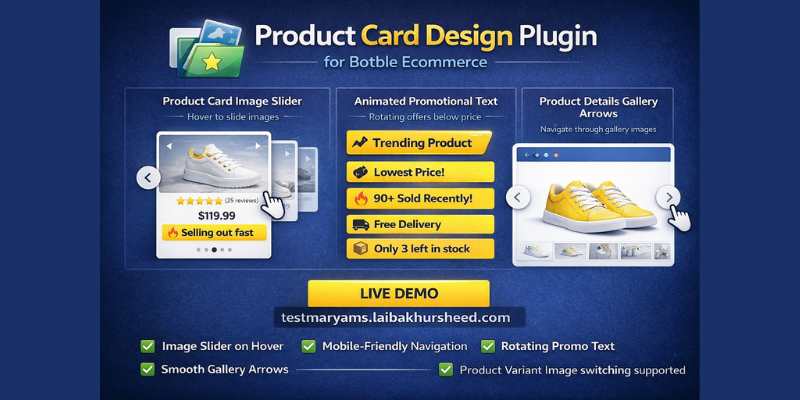
Product Card Design
PluginProduct Card Design Plugin for Botble Ecommerce
A powerful plugin that enhances product cards and product details pages with interactive features including animated text, image slider on hover, mobile-friendly navigation, and product gallery arrows.
Live Demo
See it in action: https://testmaryams.laibakhursheed.com/
Visit the demo site to see:
- Product card text animations with icons
- Mouse hover auto image slider (desktop)
- Slider arrow buttons for mobile and tablet devices
- Dot indicators for image navigation
- Product details page gallery arrow navigation
Features
1. Product Card Image Slider
- Desktop: Automatically slides through product images when user hovers over the product card
- Mobile/Tablet: Arrow buttons always visible for touch devices to navigate images
- Configurable slide interval (in seconds)
- Dot indicators showing current image position
- Smooth fade transitions between images
- Resets to first image when mouse leaves (desktop)
2. Product Details Gallery Arrows
- Arrow navigation buttons on product details page image gallery
- Works on all devices (PC, mobile, tablet)
- Circular white buttons with hover effects
- Integrates with Slick slider for smooth navigation
3. Animated Promotional Text
- Rotating text animation below product price
- Up to 6 configurable text items
- Each text type has its own icon (Tag, Fire, Truck, Box, Trending, Star)
- Yellow background (#FEEE00) with black bold text (customizable)
- Configurable display duration per text (in seconds)
- Smooth fade and slide transitions
Dynamic Text Types
- Static Text: Custom promotional text with star icon
- Free Delivery: Static promotional text with truck icon
- Selling out Fast: Static promotional text with trending icon
- Lowest Price: Dynamically checks if current price is the lowest in X days (tag icon)
- Sold Recently (Dynamic): Shows "X+ Sold Recently" based on actual order data (fire icon)
- Low Stock Warning: Shows "Only X left in stock" when stock is below threshold (box icon)
- Sold Recently (Fake): Shows random "X+ Sold Recently" (5-24) per product without actual data (fire icon)
Installation
- Upload the
productcarddesignfolder toplatform/plugins/ - Go to Admin Panel → Plugins
- Find "Product Card Design" and click Activate
- Configure settings in Admin Panel → Product Card Design → Settings
Configuration
General Settings
- Enable/disable the entire plugin
Image Slider Settings
- Enable/disable image slider feature
- Set slide interval (in seconds, default: 2 seconds)
Animated Text Settings
- Enable/disable animated text feature
- Set text rotation interval (in seconds, default: 3 seconds)
- Set background color (default: #FEEE00)
- Configure up to 6 text items with types
Dynamic Text Settings
- Lowest price check period (1-365 days)
- Sold recently period (1-100 days)
- Low stock threshold (1-100)
Requirements
- Botble CMS 7.5.0+
- Botble Ecommerce Plugin
- Products must have multiple images in gallery for slider to work
Compatibility
- Works with Shofy theme and other Botble ecommerce themes
- Supports AJAX-loaded products (infinite scroll, filters)
- Responsive design for all screen sizes
- Product variant image switching supported
Author
Maryam International LLC https://maryams.ae
Support the Author
If you find this product helpful, consider supporting the developer.
Bank Information
Bank Name- Wio Bank IBAN: AE040860000009582249758 ACCOUNT NUMBER: 9582249758 ACCOUNT NAME: MARYAM INTERNATIONAL LLC, Country United Arab Emirates
PayPal
@MohammadAqib951Scan QR Code

Leave a comment
Your email address will not be published. Required fields are marked *

Can you please share any demo of this plugin

Yes please email us for demo we will provide you admin panel login details.
[email protected]