Laravel PHP Licenser & Updates Manager - REST API, webhooks, customer portal
ImageLink
PluginImageLink Plugin for Botble CMS
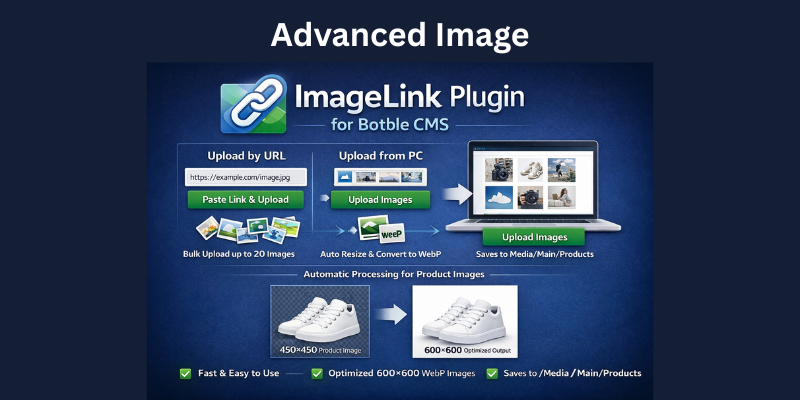
Upload product/gallery images by pasting image URLs or by uploading images from your computer. The plugin saves images into Botble Media and automatically processes them to match product image sizing.
Features
- Upload images to Media Gallery by URL (paste link)
- Upload images from PC (local upload)
- Bulk upload up to 20 images at once
- Automatically saves to Media/Main/Products
- Saves your time by automatically processing images (no need to manually edit, compress, resize, or convert)
- Automatically processes images to match product images:
- Creates a 600×600 white frame
- Centers the product image resized to 450×450
- Converts images to WebP (local upload) and optimizes file size
Compatibility
- Botble CMS: 7.x+
- Requires access to Admin → Media permissions (
media.index)
Installation
-
Upload this plugin folder to:
platform/plugins/image-link -
Go to Admin → Plugins
-
Activate ImageLink
After activation you will see a new menu item:
- Admin → Media → Add Image by Link
How to Use
Option 1: Upload by URL
- Open Admin → Media → Add Image by Link
- Paste the image URL (must start with
http://orhttps://) - Click Add
- Repeat (up to 20)
- Click Upload Images to Gallery
Option 2: Upload from PC
If you already downloaded the images to your computer:
- Choose images using Upload from PC
- The plugin will upload and process them automatically
Important Note (Some Websites Block Fetching)
Some websites block remote image downloading (hotlink protection / firewall / anti-bot). In that case, uploading by URL may fail.
If that happens:
- Manually download the image to your computer
- Go to Option 2: Upload from PC
- Upload the file
The plugin will still automatically optimize the image, convert it to WebP, and fit it to Botble product image size.
Output Folder
Uploaded images are saved to:
- Media/Main/Products
Disclaimer
- This product is not refundable.
- We do not guarantee regular updates.
- If you face any issue, we will fix it.
Support the Author
If you find this product helpful, consider supporting the developer.
Bank Information
Bank Name- Wio Bank IBAN: AE040860000009582249758 ACCOUNT NUMBER: 9582249758 ACCOUNT NAME: MARYAM INTERNATIONAL LLC, Country United Arab Emirates
PayPal
@MohammadAqib951Scan QR Code
Leave a comment
Your email address will not be published. Required fields are marked *