Laravel PHP Licenser & Updates Manager - REST API, webhooks, customer portal
Location Many Store
PluginLocation Store – UI Blocks: Many Store Map (OSM/Leaflet)
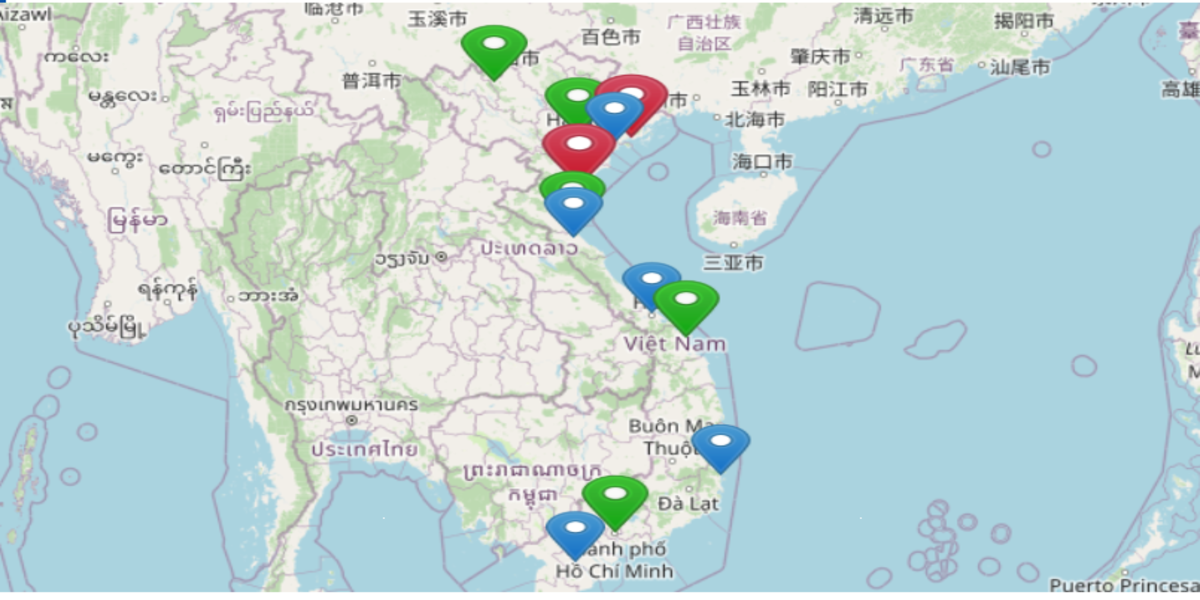
This plugin adds a UI Block/Shortcode to display a multi-store map from your mp_stores table using OpenStreetMap + Leaflet, so it does not require a Google Maps API key.
Features
Renders a real map with multiple store markers.
Displays Store Name + Address.
Click a store card to focus the map and open the marker popup.
Supports custom marker icon (URL) + icon size.
If the store record has no coordinates, the plugin geocodes the address (OSM Nominatim) and caches results in the browser for faster next loads.
Requirements
- Botble CMS + Marketplace (must have mp_stores)
- PHP 8.x
- No Google Maps key / no Billing required
Installation
Copy the plugin into:
platform/plugins/location-store
Go to Admin → Plugins and activate Location Store.
Clear cache:
php artisan view:clear php artisan cache:clear
Usage via UI Blocks
Open UI Blocks and choose:
Hisotech UI Blocks: Many Store Map
Available options:
- Title: section title
- Height: map height (px), e.g. 520
- Zoom: map zoom level (default 12)
- Limit: number of stores to load (default 100)
- Store IDs: filter by IDs (e.g. 1,2,3), empty = all
- Marker Icon URL: custom marker icon URL (optional)
- Marker Icon Size: icon size in px (e.g. 32)
- Show List: show store list below the map (yes/no)
Usage via Shortcode
Insert into a page/post:
[many-store-map title="Store Locations" height="520" zoom="12" limit="100" store_ids="" marker_icon="" marker_icon_size="32" show_list="yes" ]
Shortcode Attributes
- title (string)
- height (number, px)
- zoom (number)
- limit (number)
- store_ids (string like 1,2,3)
- marker_icon (url)
- marker_icon_size (number)
- show_list (yes|no)
Store Data Source
The plugin reads from mp_stores these base columns:
id, name, address, city, state, country
If your database has coordinates:
latitude/longitude or lat/lng the plugin will automatically use them and skip geocoding.
Notes on Geocoding (OSM Nominatim)
First load may be slower if many stores require geocoding.
Results are cached in the browser to speed up subsequent loads.
For large datasets (hundreds+ stores), consider adding lat/lng to mp_stores or implementing server-side caching.
Troubleshooting
1) Blank/gray map area
Open DevTools (F12) → Console.
If tile requests to tile.openstreetmap.org are blocked, check network/firewall.
Clear cache and reload after plugin updates.
2) Wrong marker locations
Ensure store addresses are complete (address + city + state + country).
For best accuracy/performance, store coordinates (lat/lng) in the database.
Extension Ideas
Sidebar list layout (list on the right, map on the left)
Filters by City/State/Country
Marker clustering for large numbers of stores
SupportMe: MBBank 0002018138546
Support the Author
If you find this product helpful, consider supporting the developer.
Bank Information
SupportMe: MBBank 0002018138546
Leave a comment
Your email address will not be published. Required fields are marked *

you are very handsome

you too

very goood
thanks

you cant extract file please update file download
Thank you for your experience. You can re-download the file. I have updated it.