Laravel PHP Licenser & Updates Manager - REST API, webhooks, customer portal
Express Checkout
Plugin*** Changelog *** 1.0.2 - Fixed issue product images not updating with attribute variation
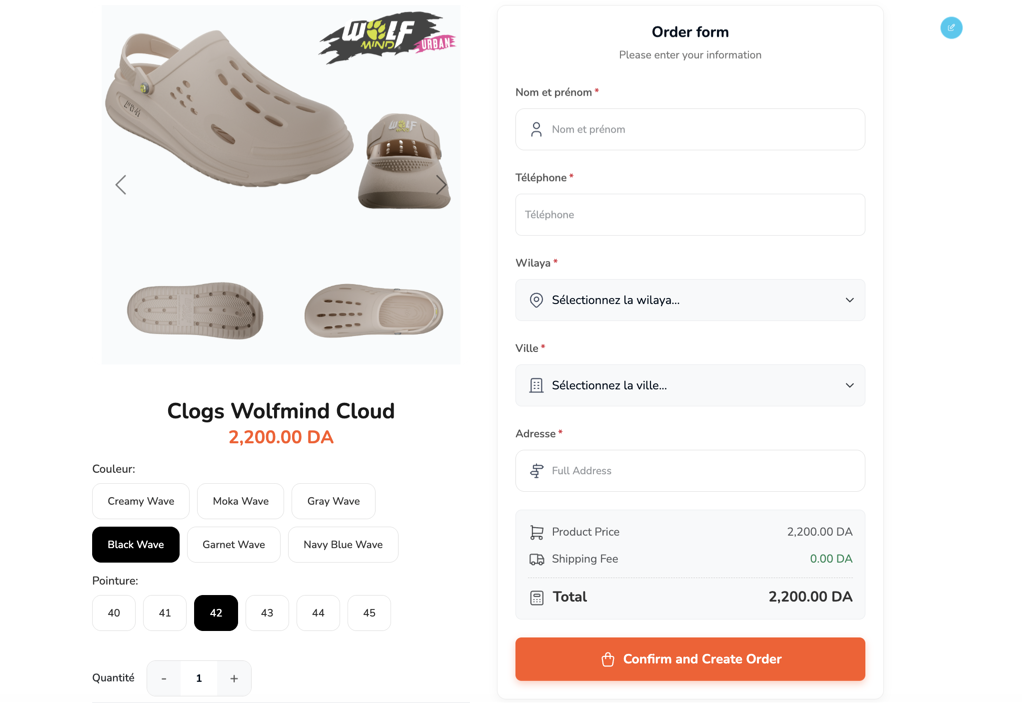
The Express Checkout Plugin is a high-performance, single-product checkout solution designed for Botble CMS. It allows you to convert any page or post into a high-converting landing page by embedding a fully interactive checkout form directly into your content.
🚀 Feature List*
 - Single-Page AI Checkout: Eliminates the multi-step checkout friction. Customers fill their details and pay on the same page.
- AJAX-Powered Processing: Orders are placed instantly without refreshing the browser, providing a premium user experience.
- Dynamic Shipping Engine: Real-time integration with your existing shipping rules. Fees are updated automatically as soon as a customer enters their location.
- Full Attribute Support: Supports product variations (e.g., color swatches, size selectors) with automatic image updates.
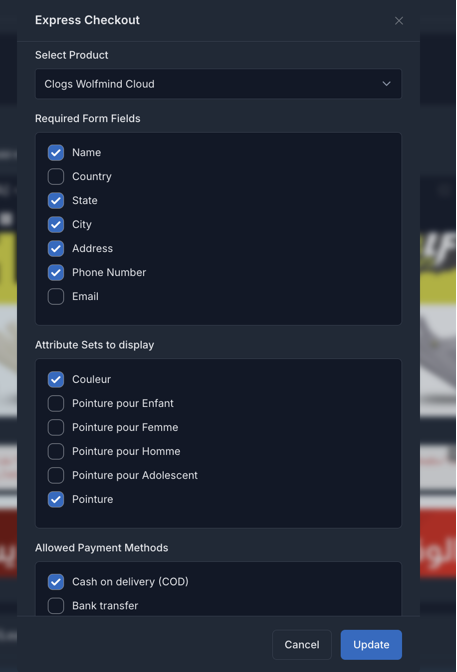
- Configurable Form Fields: From the admin panel, you can decide which fields (Phone, Email, State, Address) are required.
- Integrated Product Gallery: Features a built-in image carousel with professional transitions
- Prooducts Zoom Effect on hover.
- Multi-Payment Support: Compatible with Cash on Delivery (COD), Bank Transfer, and all major payment gateways (Stripe, PayPal, etc.) via the standard Payment plugin.
- Inventory & Stock Control: Automatically checks stock availability and prevents over-ordering.
- Anti-Spam Security: Includes honeypot fields to filter out bot-generated orders.
- Multilanguage support
🛠️ Requirements
- Platform: Botble CMS 7.5+ (Laravel-based).
- PHP 8.2+
- Dependencies:
    Ecommerce Plugin (Required): Handles products, orders, and shipping logic.
    Payment Plugin (Recommended): For processing online payments.
📦 Installation Automatic Installation (Recommended) Go to your Admin Dashboard → Plugins. Find Express Checkout in the list. Click Activate.
Manual Installation Upload the express-checkout folder into the platform/plugins/ directory of your project. If the plugin contains a composer.json (uncommon for internal plugins), run composer update in the root directory. Activate the plugin through the Admin UI or via CLI: php artisan plugin:activate express-checkout
🔍 Usage Example: Hero Landing Page If you are launching a new product, you can create a beautiful landing page and drop the [express-checkout] Shortcode UI Blocks at the bottom. The customer reads the features, sees the zoomed images, selects their size, and places the order instantly—all in under 30 seconds.
🤝 Support
If you have any questions or need assistance, feel free to reach out via:
Email: [email protected] LInkedin: https://www.linkedin.com/in/zakblacki/
Developed with ❤️ by Zakblack
Accept USDT/Redotpay/WIse.
Support the Author
If you find this product helpful, consider supporting the developer.
Bank Information
Account Number: 7778522303 - IBAN: 02000166777852230368 - SWIFT/BIC: NATXDZALXXX
Leave a comment
Your email address will not be published. Required fields are marked *