Laravel PHP Licenser & Updates Manager - REST API, webhooks, customer portal
Wholesale
PluginThis is a paid plugin available on Envato Market. You need to purchase and download it from Envato to use it.
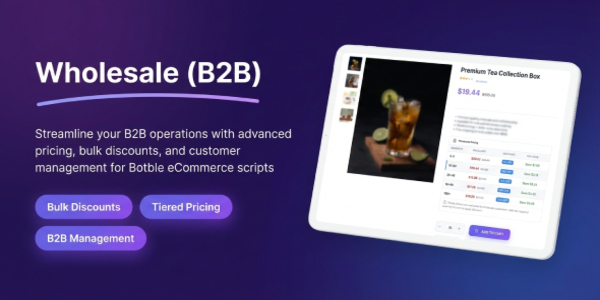
Wholesale – B2B Wholesale Pricing & Customer Groups for Botble E-commerce
Wholesale is a powerful B2B plugin for Botble ecommerce that enables you to create customer groups, set tiered quantity-based pricing, enforce minimum order quantities (MOQ), and control product visibility for wholesale buyers. Transform your e-commerce store into a full B2B wholesale platform.
Wholesale integrates seamlessly with Botble E-commerce. It allows store owners to create wholesale customer tiers (Bronze, Silver, Gold, Platinum), define quantity-based pricing rules per product, validate minimum order quantities, and manage a wholesale registration workflow with admin approval. Wholesale customers see exclusive pricing tables and can access wholesale-only products.
Wholesale is a perfect solution for e-commerce businesses looking to add B2B capabilities to their online store. Features include customer group management, tiered pricing rules, MOQ validation, product visibility control, wholesale registration with approval workflow, and seamless cart/checkout integration – everything you need to run a successful wholesale operation.
⚠ Important Requirement
This plugin requires the Ecommerce plugin to be installed and activated. Wholesale is specifically designed to work only with Botble ecommerce scripts and may not function properly with other ecommerce solutions.
The plugin integrates seamlessly with your existing Botble E-commerce store, automatically displaying wholesale pricing tables on product pages, enforcing MOQ at checkout, and calculating tiered discounts in the cart – all based on the customer’s assigned wholesale group.
We have a dedicated support center for all of your support needs. It includes our Documentation and Ticket system for any questions you have. We usually get back to you within 12-24 hours.


 > ## Highlighted Features (Last Updated: January 2025):
- Buy One Time & Get Free Updates Forever
- Free Installation – If you will face any problem during installation – we will help you and It’s FREE
- Easy Installation – Install Wholesale easily with no coding or server knowledge in a few minutes with our easy-to-use installer and documentation.
- High Performance – Wholesale is lightweight and has lighting fast performance and page load time out of the box.
- Customer Groups – Create unlimited wholesale customer tiers (Bronze, Silver, Gold, Platinum) with customizable default discounts and priorities.
- Tiered Pricing Rules – Set quantity-based pricing rules per product with percentage or fixed price discounts for different customer groups.
- Minimum Order Quantity (MOQ) – Enforce minimum order quantities per product and per customer group with quantity increment support.
- Product Visibility Control – Set products as public, wholesale-only, or visible to specific customer groups only.
- Wholesale Registration Workflow – Customers can apply for wholesale accounts with company name, tax ID, and expected volume. Admins review and approve or reject applications.
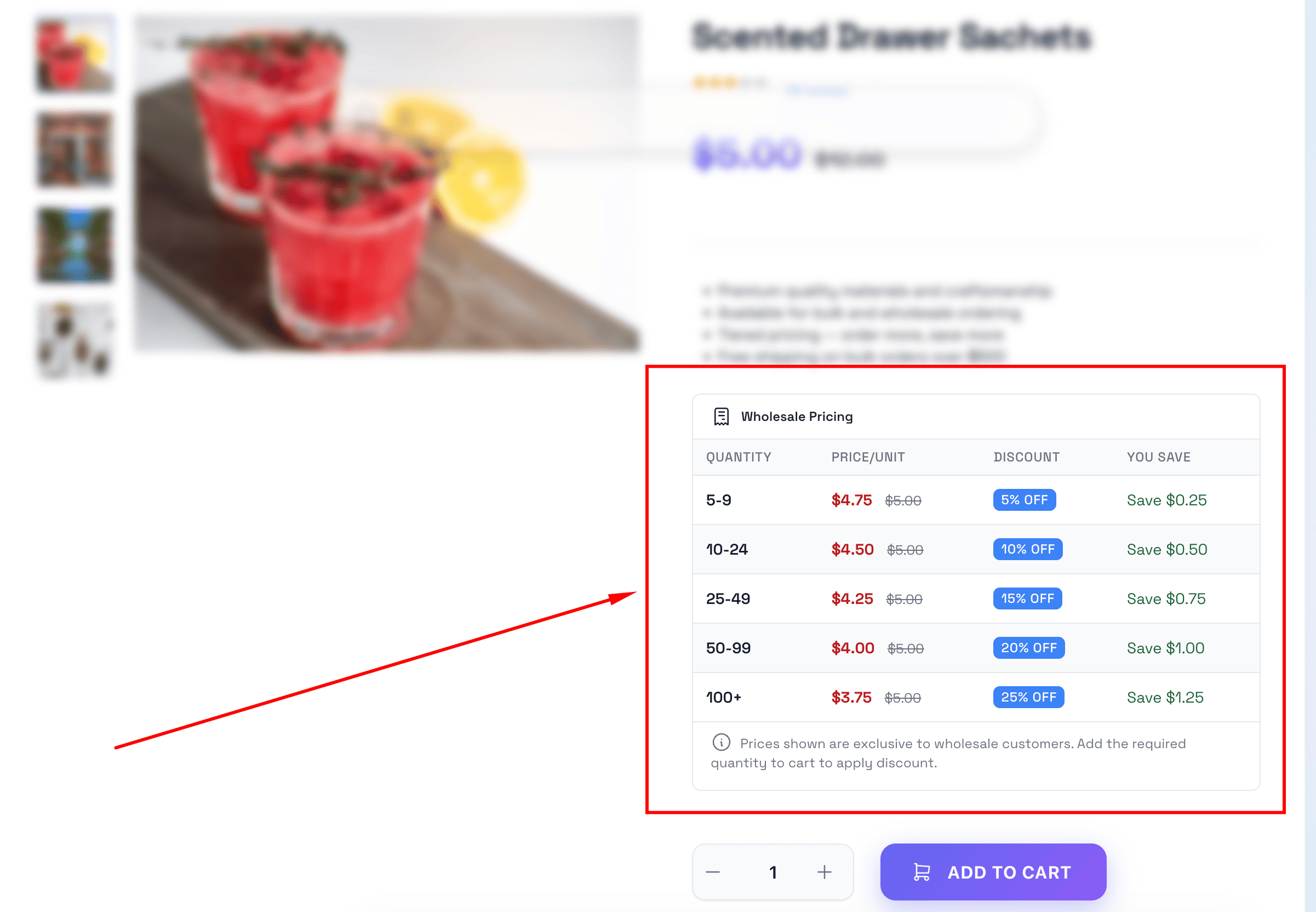
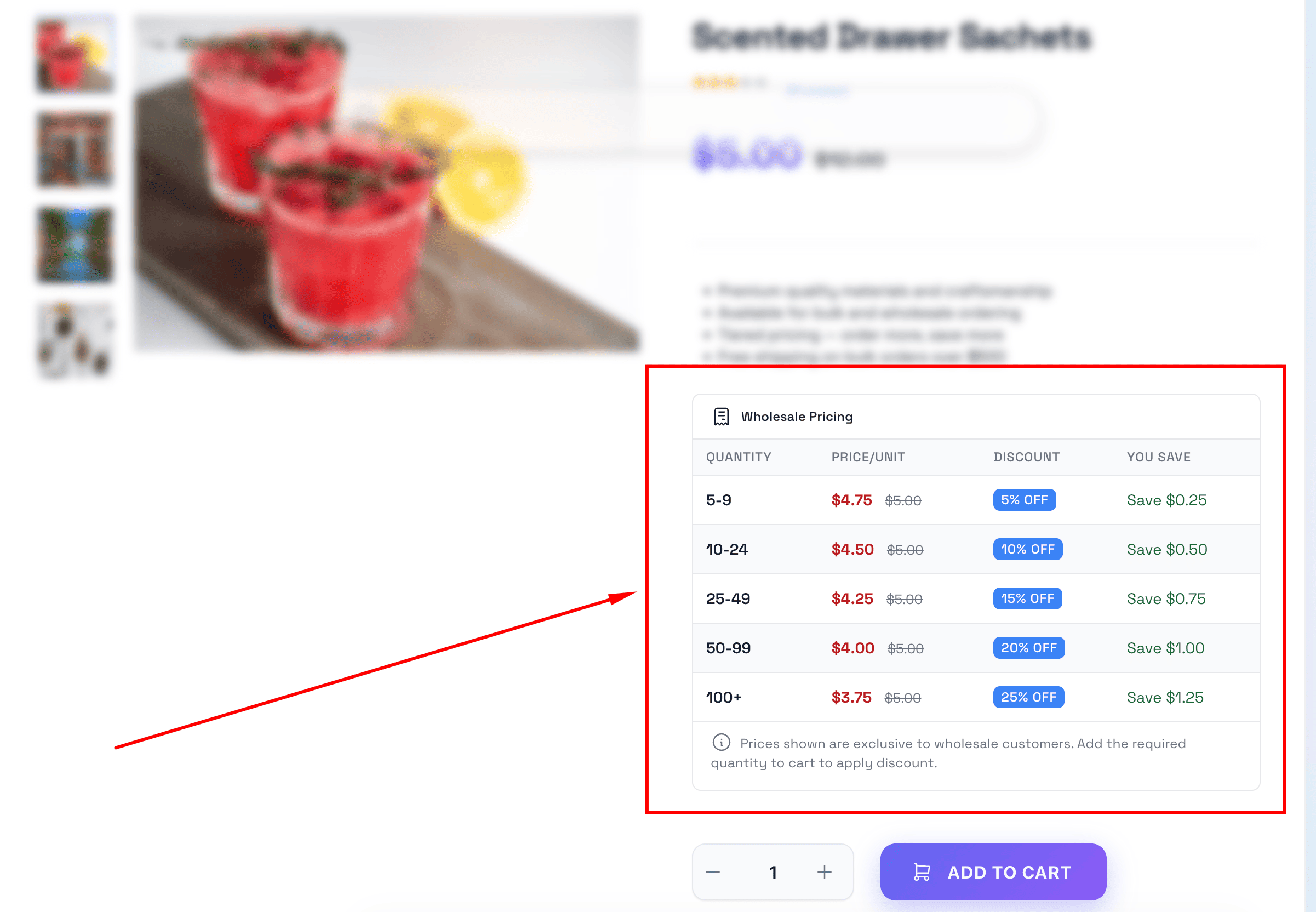
- Pricing Table Display – Automatically show quantity-based pricing tables on product pages for wholesale customers.
- Smart Price Calculation – Automatically calculates best wholesale price based on quantity, customer group, and available pricing rules.
- Cart & Checkout Integration – Wholesale prices are automatically applied in cart and checkout with correct totals.
- MOQ Validation at Checkout – Validates minimum order quantity and value requirements before allowing checkout.
- Multiple Group Support – Customers can belong to multiple wholesale groups; the best discount is automatically applied.
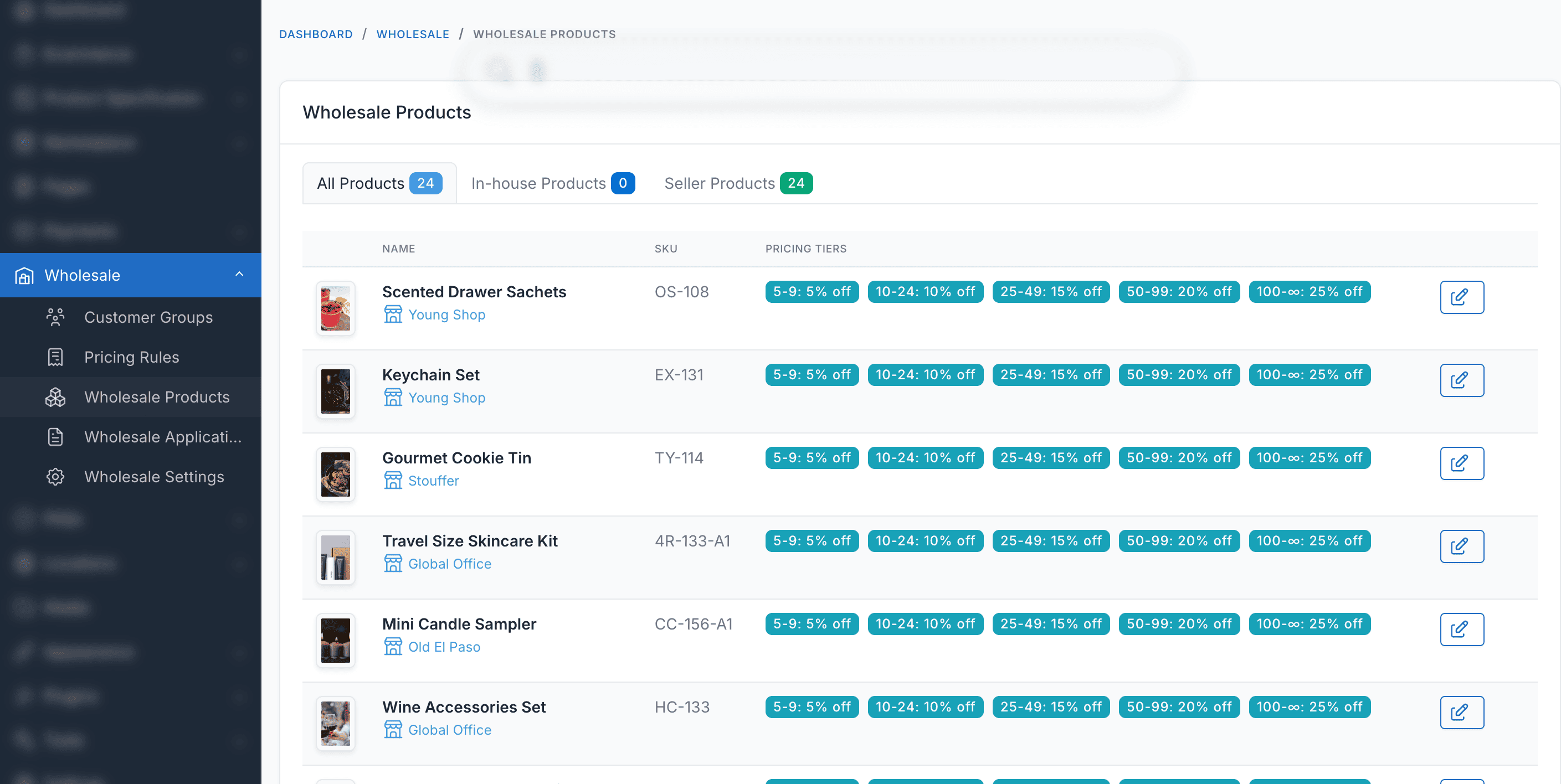
- Admin Management – Easy-to-use admin interface to manage customer groups, pricing rules, applications, and settings.
- Configurable Settings – Master toggle, approval requirement, guest price visibility, multiple group support, and default group assignment.
- Role-based Permissions – Control access with granular permission settings for different admin roles.
- Multi-language Support – Available in 30+ languages including English, French, German, Spanish, Vietnamese, Japanese, Korean, Chinese, Arabic, and more.
- Translations – Wholesale is fully translation ready and can be easily translated to any language from admin area.
- Ongoing Support: Benefit from our dedicated support team, ready to help you with any questions or challenges you may encounter during integration and beyond. We always reply your ticket within 1 business day.



Screenshots
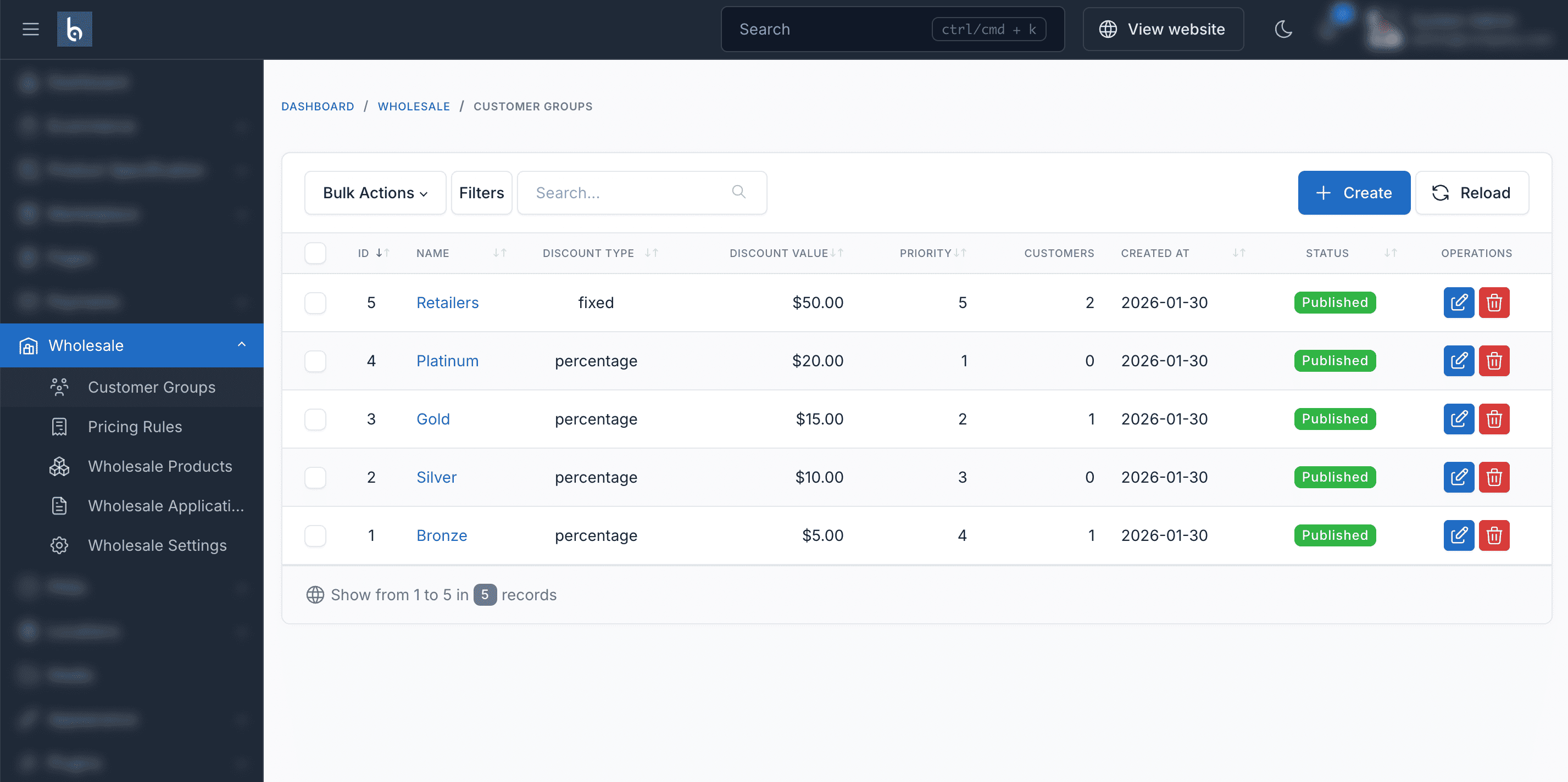
Customer Groups Management
Create and manage wholesale customer tiers with default discounts and priority settings.

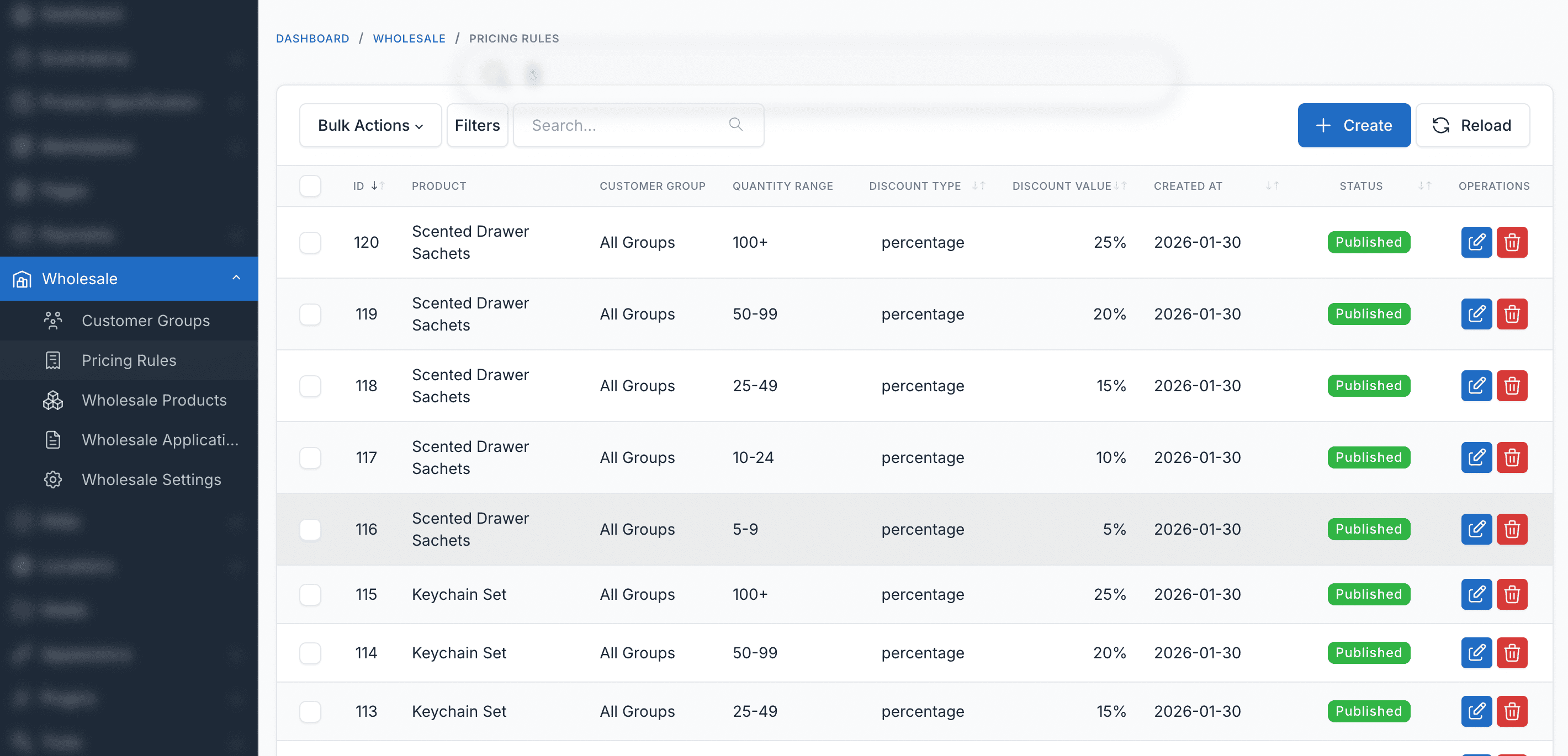
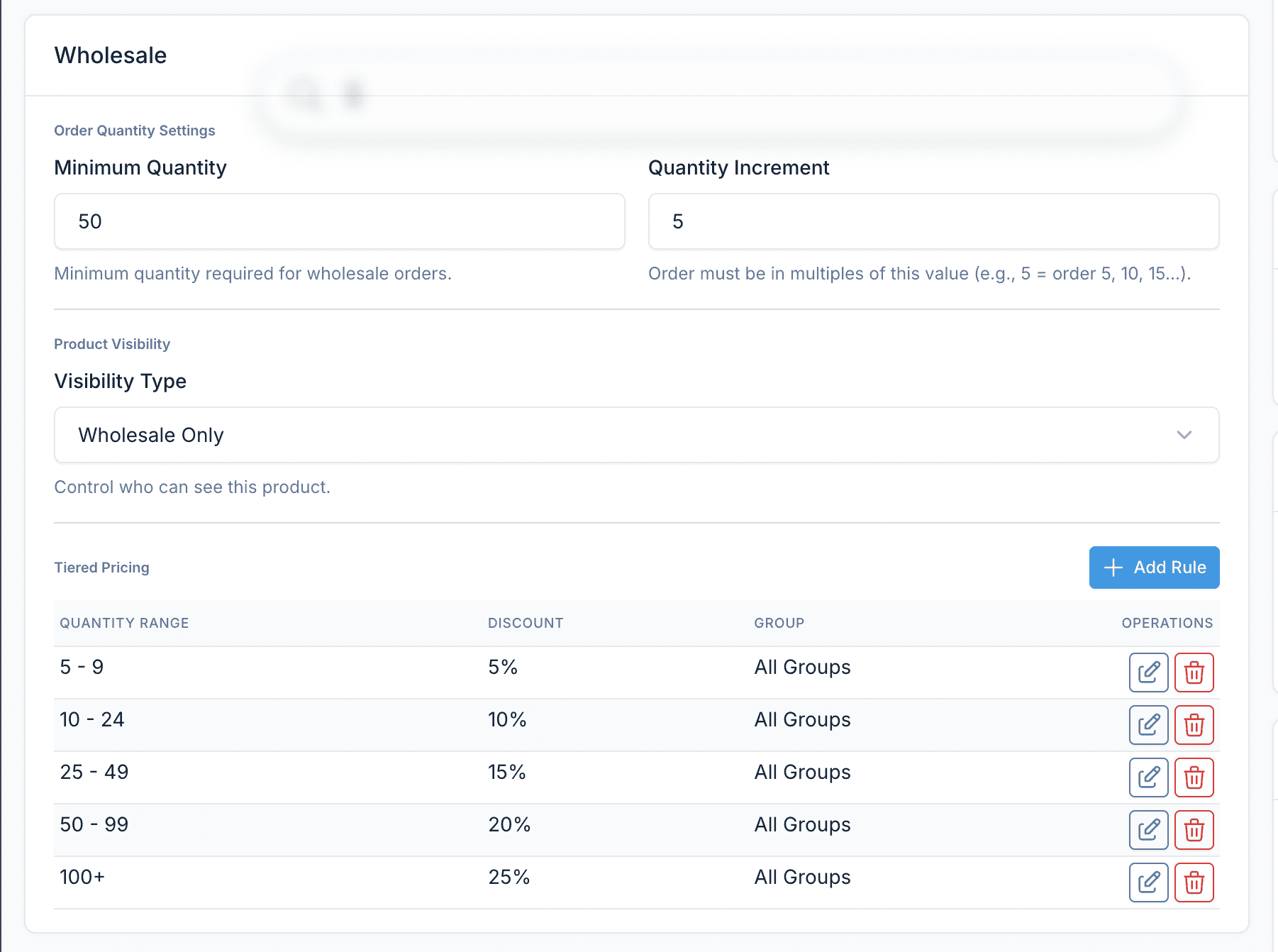
Tiered Pricing Rules
Set quantity-based pricing rules per product with percentage or fixed price discounts.

Product Pricing Table
Wholesale customers see a pricing table on product pages showing all available quantity-based discounts.
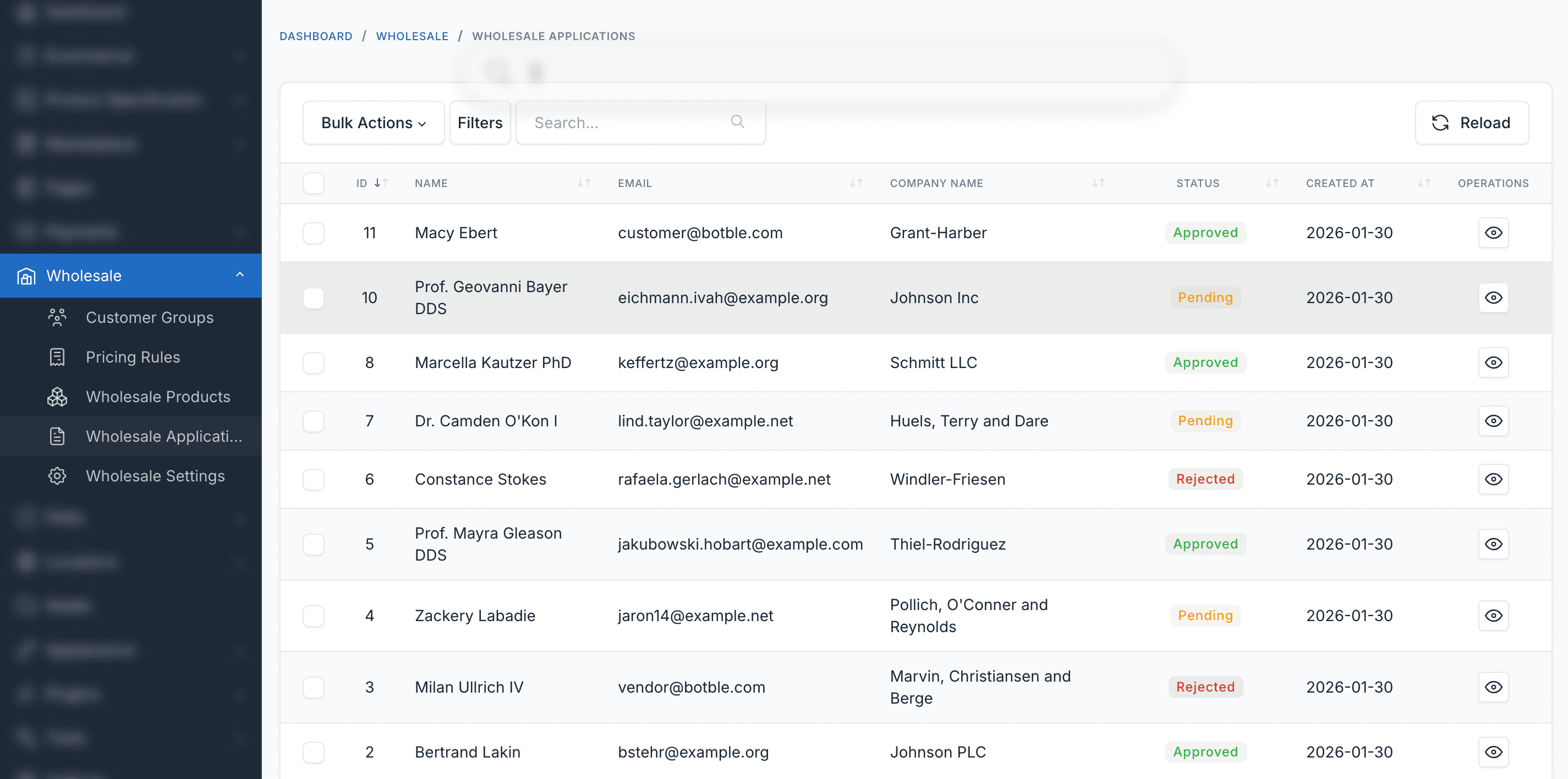
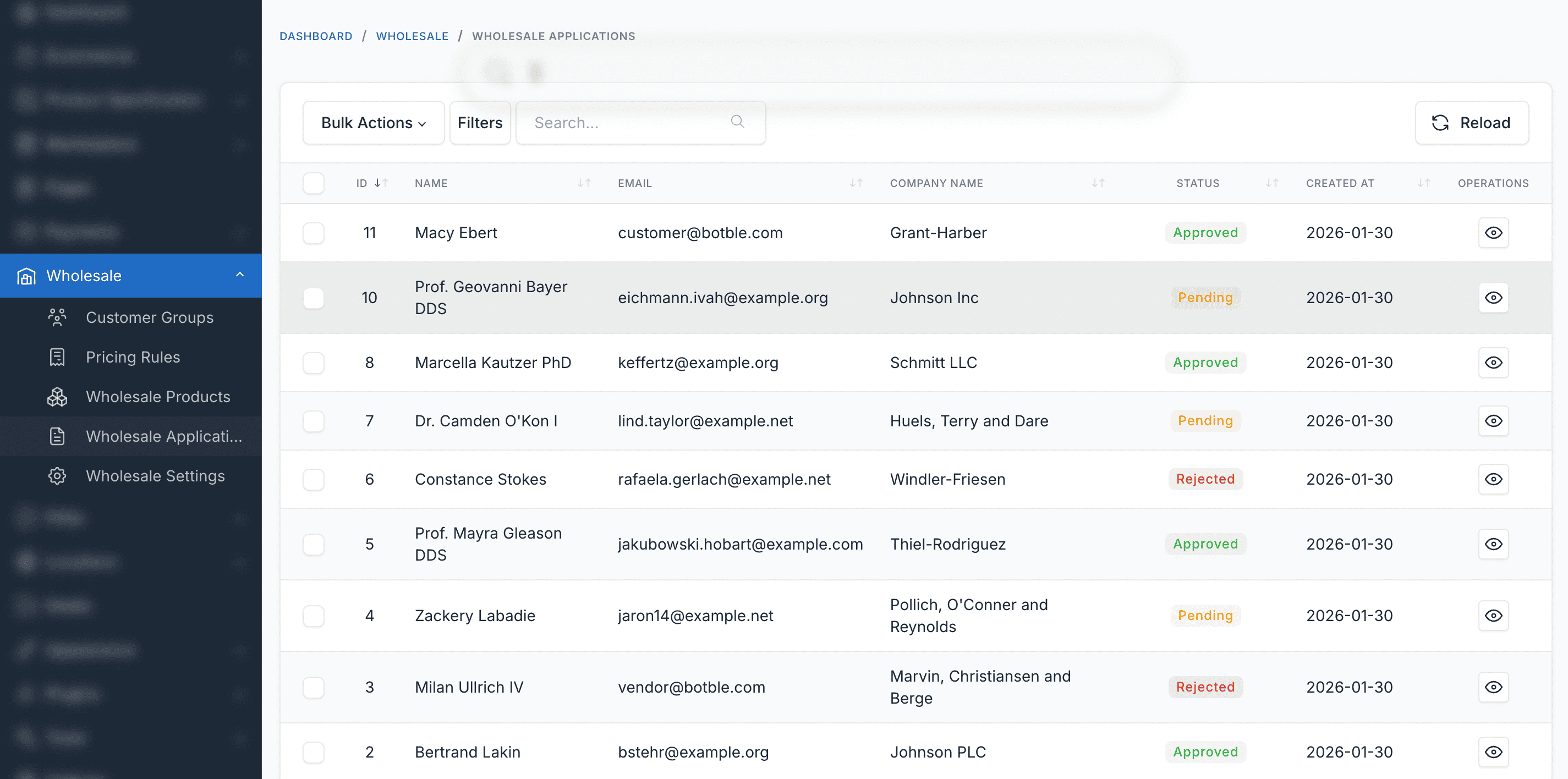
Wholesale Applications
Review and approve or reject wholesale registration applications from customers.
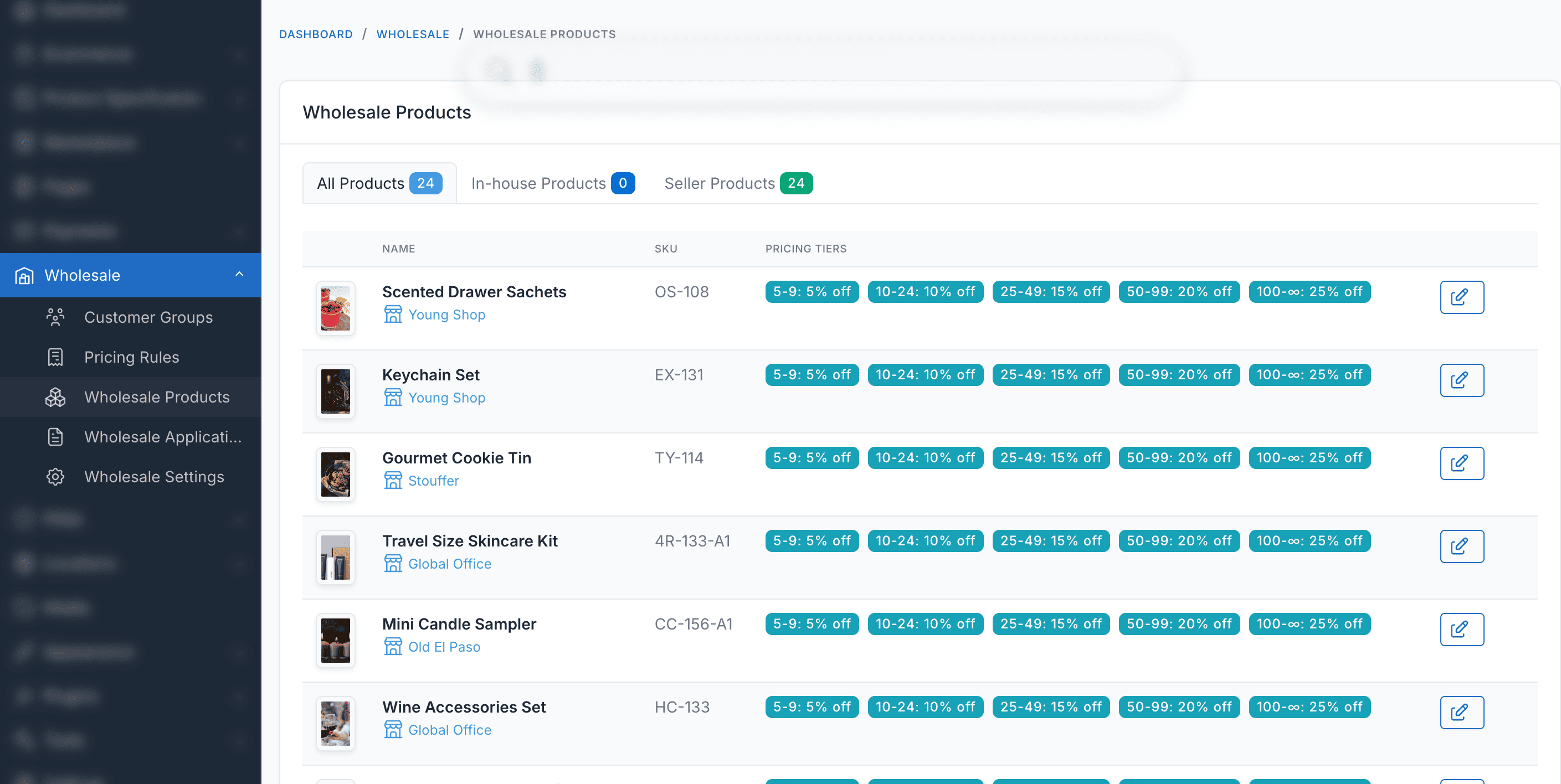
Product Visibility Settings
Control which products are visible to wholesale customers, specific groups, or everyone.
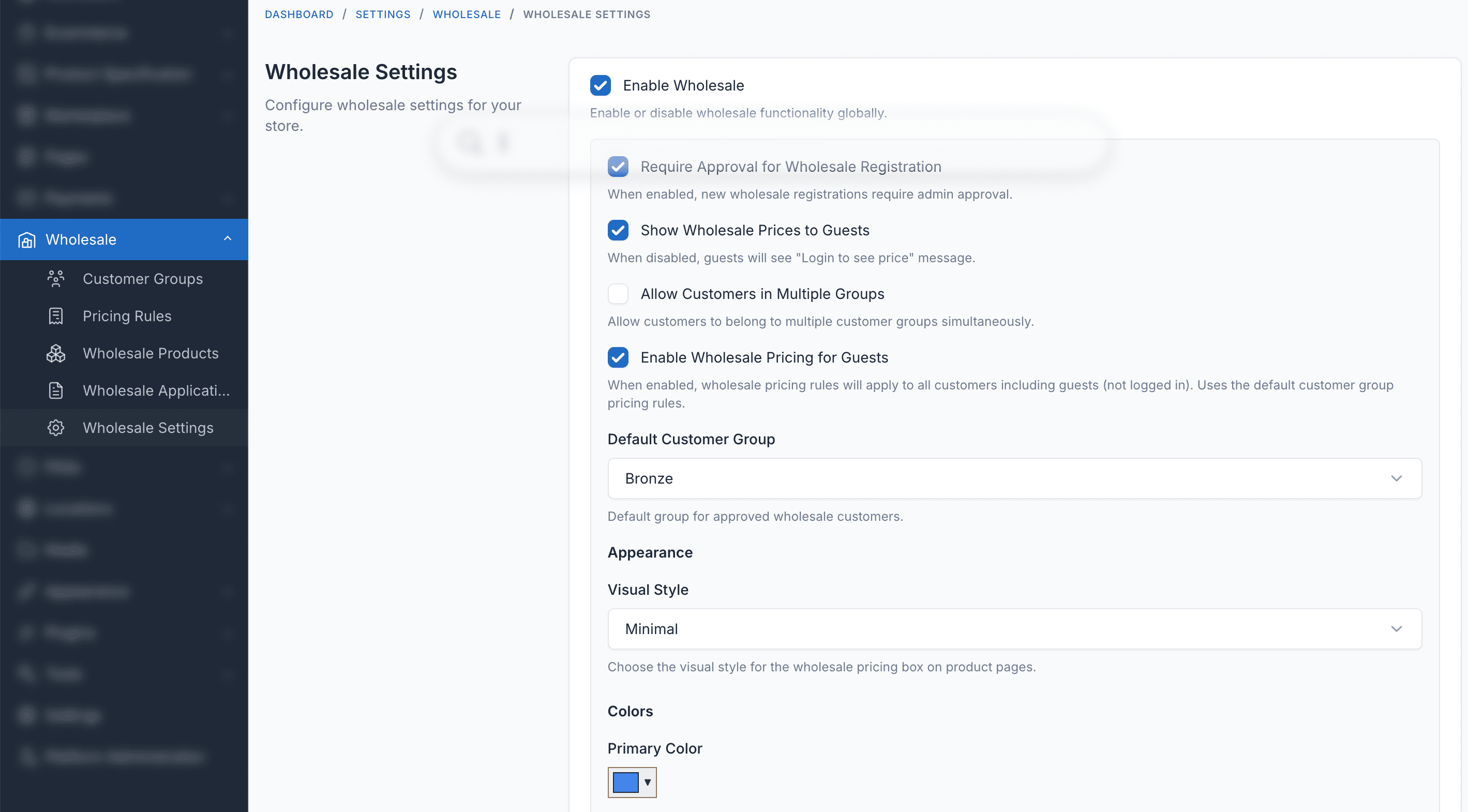
Wholesale Settings
Configure plugin settings including approval requirements, guest pricing, and default group.
Demo
- Admin Panel: https://wholesale.botble.com/admin
- Admin account: admin – 12345678 (username & password are autofilled)
- Customer login page: https://wholesale.botble.com/login
- Customer account: [email protected] – 12345678
Requirements
- Botble CMS version 7.6.0 or higher
- PHP version 8.2 or higher
- Botble E-commerce plugin (required)
Installation Guide
Installing Wholesale is quick and straightforward:
- Download the plugin from your CodeCanyon downloads page
- Extract the downloaded zip file
- Upload the extracted folder to your website’s
platform/plugins/ecommerce-wholesalefolder - Go to Admin > Plugins and activate the Wholesale plugin
- Refresh your website
After installation, you can access Wholesale from Ecommerce > Wholesale in your admin panel.
Usage Guide
Setting Up Customer Groups
- Log in to your admin panel
- Navigate to “Wholesale” > “Customer Groups”
- Click “Create” to add a new group
- Enter group name, description, default discount, and priority
- Set minimum order amount and quantity defaults
- Save and assign customers to the group
Creating Tiered Pricing Rules
- Navigate to a product edit page
- Find the “Wholesale” metabox
- Add pricing rules with minimum quantity, discount type, and value
- Optionally assign rules to specific customer groups
- Save the product
Managing Wholesale Applications
- Navigate to “Wholesale” > “Applications”
- Review pending applications with company details
- Approve to assign customer to default wholesale group
- Or reject with a reason message
Configuring Product Visibility
- Public: Visible to all customers
- Wholesale Only: Only visible to wholesale customers
- Specific Groups: Only visible to selected customer groups
Best Practices
- Create Clear Tiers: Design customer groups with clear progression (Bronze to Platinum) to incentivize growth
- Set Strategic MOQs: Balance minimum quantities to ensure profitable orders while remaining attractive to buyers
- Use Quantity Breaks: Create tiered pricing that rewards larger orders with better per-unit pricing
- Review Applications Promptly: Respond to wholesale applications quickly to maintain customer interest
Changelog
Version 1.0.0 – Feb – 2025
 - Customer groups management with tiers and priorities
 - Tiered pricing rules (percentage and fixed price)
 - Quantity-based pricing with automatic best price selection
 - Minimum order quantity (MOQ) validation per product and group
 - Quantity increment enforcement
 - Product visibility control (public, wholesale-only, group-specific)
 - Wholesale registration and application workflow
 - Admin approval/rejection with notifications
 - Pricing table display on product pages
 - Cart and checkout wholesale price integration
 - MOQ validation at checkout
 - Multiple group support per customer
 - Configurable wholesale settings
 - Role-based permissions
 - Multi-language support (30+ languages)
Support & Documentation
Dedicated Support
Our support team is ready to help you with any questions or issues. We typically respond within 12-24 hours.
Comprehensive Documentation
Our detailed documentation covers everything from installation to advanced features.
About Botble
Botble is a team of experienced developers dedicated to creating high-quality, user-friendly web applications and plugins. With years of experience in web development, we strive to deliver products that meet the highest standards of quality and performance.
Visit us at botble.com
Leave a comment
Your email address will not be published. Required fields are marked *
Comments from Envato Marketplace
View all on CodeCanyon
.jpg)


Hi,
The product export/import feature is part of the core Ecommerce plugin, and it does not include wholesale pricing columns. Wholesale prices need to be set up directly in the admin panel for each product.
To set wholesale prices: go to Admin → Products → Edit product, you will see the Wholesale Pricing section where you can configure bulk pricing tiers.
