Laravel PHP Licenser & Updates Manager - REST API, webhooks, customer portal
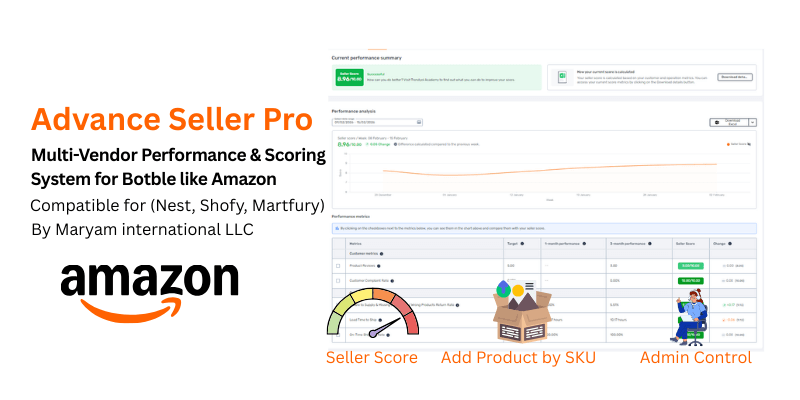
Advanced Seller Pro – Multi-Vendor Performance & Scoring System for Botble like Amazon-Style
PluginAdvanced Seller — The Ultimate Multi-Vendor Performance Engine
Changelog CLICK HERE
Amazon & Trendyol-Style Vendor Dashboard, Scoring System & Multi-Seller Offers for Botble CMS
Turn your marketplace into a powerhouse. Advanced Seller brings the same seller performance tracking, competitive pricing panels, and vendor accountability systems used by Amazon, Trendyol, Noon, and Jumia — directly into your Botble-powered marketplace. No custom development. No monthly fees. Just activate and dominate.
Version: 1.0.2
Author: Maryam International LLC (www.codeupp.xyz)
Compatibility: Botble CMS 7.3+, Martfury & Shofy Themes
Requires: Ecommerce Plugin, Marketplace Plugin

🔗 Open Changelog: Visit
https://your-domain.com/advanced-seller/changelog— the link auto-detects your domain (works on localhost, shared hosting, VPS, any domain). Also accessible from Admin Panel → Advanced Seller → Changelog.
Live Demo — Try It Now
Seller Dashboard Demo:
- URL: https://martfury.codeupp.xyz/customer
- Email:
[email protected] - Password:
Dubai@2020
Log in as a vendor and explore the full Reports dashboard, Real-time Performance analytics, Score breakdown, Product Reviews, and Warnings — all live.
Screenshots


Why Advanced Seller?
Most marketplace plugins give vendors a product list and an order table. That's it. Advanced Seller changes the game:
- Vendors compete on price — customers see all sellers for the same product in one panel, just like Amazon's "Other Sellers" box
- Vendors track their performance — real-time views, orders, conversion rates, hourly sales graphs, and product-level analytics
- Admins control quality — score every vendor automatically based on reviews, complaints, shipping speed, and failure rates
- Bad sellers get warnings — and can be blocked with one click
- Good sellers shine — their scores are visible to customers, building trust and driving sales
This is not just a plugin. It's a marketplace management system.
Key Features at a Glance
| Feature | Description |
|---|---|
| Multi-Seller Offers Panel | Amazon-style "Check offers from X sellers" on every product page |
| Add Product by SKU or URL | Vendors copy any product instantly — paste a link or SKU, with warranty option |
| Vendor Performance Dashboard | Overview, Real-time, Reviews, Score — 4 powerful tabs |
| Seller Scoring System | Auto-calculated from 5 metrics + admin manual adjustment |
| Seller Score Info Tooltip | ⓘ icon next to score — hover/touch shows score details, verified badge, seller type |
| Expected Delivery System | Dynamic delivery date on product pages & offers panel with timezone support |
| Delivery Toggle (On/Off) | Admin & vendors can enable/disable expected delivery per seller |
| Handling Time System | Vendor sets fulfillment promise (1-7 days). Live countdown timer on orders. Score based on actual pick time vs promise |
| Sellers Handling Time (Admin) | Admin overview of all vendors' handling performance — color-coded red/green/orange |
| Warranty System | Per-product warranty toggle + duration (1 month to 10 years) — shown in offers panel |
| Admin Vendor Management | Score targets, warnings, block/unblock, detailed reports |
| Product View Tracking | Every product page visit tracked per vendor |
| Cart & Favorite Tracking | Know exactly how many customers add to cart or wishlist |
| Product Document Request | Admin requests invoices/certificates from vendors. Full document history, re-request anytime, vendor popup submission |
| Auto Cache Clear | Plugin clears all caches on activate/deactivate — perfect for shared hosting |
Feature Details
1. Multi-Seller Offers Panel — "The Amazon Buy Box"
When a customer views any product, they see:
"Check offers from 3 other sellers"
Clicking opens a sleek right-side sliding panel showing every seller offering that product:
- Price with original price strikethrough and discount % badge
- Delivery estimate (dynamic: "Order in X h Y m — Get it by 15 Feb")
- Seller name with link to their store
- Seller Score (color-coded: green ≥ 7, orange 4-7, red < 4)
- Positive review percentage
- Warranty info
- "SELECTED OFFER" badge on the product you're currently viewing
- "VIEW OFFER" button opens that specific vendor's product page
- "ADD TO CART" button adds directly from the panel
This single feature can increase your marketplace sales by 30%+ — because customers see competitive prices and buy with confidence.
2. Add Product by SKU or URL — "List in 10 Seconds"
Vendors don't need to create products from scratch. They simply:
- Paste a product URL or SKU into the search box
- System instantly finds the product and shows a full preview (image, name, price, categories, description)
- Vendor sets their own Price, Sale Price, SKU, and Stock Quantity
- Click "Create Product" — done!
What gets copied automatically:
- All product images
- Full description
- Categories & tags
- Product attributes
- A unique barcode is auto-generated (
MS-2026-XXXXXformat) - A unique slug is created for the vendor's product page
Smart features:
- Accepts both product URLs and raw SKU codes
- Extracts SKU from URLs like
https://yoursite.com/products/gaming-keyboard-SKU-SELLER01 - Prevents vendors from copying their own products
- Traces to the root inhouse product even when copying from another vendor
- Product goes through admin approval workflow (if enabled)
3. Vendor Reports Dashboard — "Know Everything"
Four powerful tabs give vendors complete visibility into their business:
Tab 1: Overview
The command center. At a glance, vendors see:
- Today's net sales vs Yesterday's net sales with % change arrows
- Interactive hourly sales graph — hover/touch to see exact sales at any hour, with Today (orange) vs Yesterday (grey dashed) comparison
- 4 stat cards with beautiful white-circle icons:
- Total Views — how many customers viewed their products today
- Net Order Quantity — orders received today
- Net Items Sold — total items shipped
- Sales Conversion Rate — views-to-orders percentage
- Product Performance sidebar — top 5 products by sales with image, barcode, and revenue
- Overall Score summary — score badge, status label, and metric breakdown
- Performance Analysis chart — score trend over the last 8 weeks
Tab 2: Real-time Performance
Deep-dive analytics with:
- 5 summary cards: Total Views, Seller Views, Added to Cart, Gross Orders, Conversion Rate — each with % change vs previous period
- Daily sales bar chart with hover tooltips showing exact amounts
- Conversion rate sparkline
- Detailed product table with columns:
- Product name + image + model code (click to copy)
- Total Views | Gross Favorites | Active Favorites | Seller Views
- Added to Cart | Gross Order Quantity | Sales Conversion Rate
- Auto-refreshes every 60 seconds — truly real-time
Tab 3: Product Reviews
All customer reviews for the vendor's products in one place:
- Product name & image
- Customer name
- Star rating — color-coded (green ≥ 4 stars, orange = 3, red < 3)
- Review comment
- Date
- Paginated for easy browsing
Tab 4: Score — "Your Seller Report Card"
The heart of the scoring system:
- Overall Seller Score badge — X.XX / 10.00 with status:
- Successful (green, ≥ 8.5)
- Good (orange, 7.0 - 8.49)
- Needs Improvement (red, < 7.0)
- Score history line chart — track your progress week by week
- Detailed metrics table:
| Metric | Group | What It Measures |
|---|---|---|
| Product Reviews | Customer | Average star rating from customers |
| Customer Complaint Rate | Customer | % of orders that were canceled/refunded |
| Failure to Supply Rate | Operational | % of vendor-initiated cancellations only (admin cancels have no effect) |
| Lead Time to Ship | Operational | Average hours from order received → picked/delivered (Amazon/Trendyol style, uses ec_shipments) |
| On-Time Shipping Rate | Operational | % of orders fulfilled within 1.5× vendor's handling time promise |
Each metric shows: Target value, 1-month performance, 3-month performance, Score, and Change vs previous period.
4. Vendor Warnings System
- Vendors receive warnings from admin with subject + detailed message
- Unread badge count in the sidebar
- Mark as read functionality
- Full warning history with dates
5. Admin Panel — "Total Control"
Vendor List & Reports
A complete overview of every vendor in your marketplace:
- Store Name with email
- Owner name
- Product count
- Live Seller Score — dynamically calculated, color-coded badge (green/red)
- Warning count — with badge
- Status — Active or Blocked
- Action buttons with clear labels:
- Report — view detailed vendor analytics
- Warnings — view vendor's warning history
- Block / Unblock — instantly hide or restore a seller's products
- Score — manually adjust the vendor's score (+/- points)
Manual Score Adjustment:
Click the "Score" button on any vendor to reveal an inline form. Enter a value from -10 to +10 — this gets added to the dynamic calculation. Perfect for:
- Rewarding exceptional sellers (+1, +2)
- Penalizing sellers after manual complaints (-1, -2)
- The final score is always: Dynamic Calculation + Admin Adjustment, clamped to 0-10
Score Targets Configuration
Admin controls what "good" looks like:
- Product Reviews — target average star rating (default: 5.00)
- Customer Complaint Rate — target max % (default: 0.10%)
- Failure to Supply Rate — target max % (default: 0.50%)
- Lead Time to Ship — target max hours (default: 11.74 hours)
- On-Time Shipping Rate — target min % (default: 95.00%)
Each metric has a configurable max score weight (default: 10 each). Adjust these to prioritize what matters most for your marketplace.
Group badges are clearly visible with bold white text on colored backgrounds.
Warnings Management
Full warning control:
- Send warnings to any vendor — select from dropdown showing store name, owner, and current score
- View all warnings across the marketplace with:
- Seller name (linked to their report)
- Live seller score with color badge
- Subject + message preview
- Sent by (admin name)
- Read/Unread status
- Date
- Remove button — delete any warning permanently
- Per-vendor warning history — click any vendor to see only their warnings
Block/Unblock Sellers
One-click seller management:
- Block — seller's products are hidden from the storefront instantly
- Unblock — products are restored
- Confirmation dialog prevents accidental clicks
6. Handling Time System — "Amazon/Trendyol-Style Fulfillment Tracking"
The Handling Time system measures how fast vendors process and ship orders — the core metric used by Amazon, Trendyol, and Noon to rank sellers.
Vendor: Set Handling Time
Vendor Dashboard → Delivery Settings → Handling Time:
- Set handling time in days (1-7 days)
- This is the vendor's promise — how many days they need to process an order and hand it to the carrier
- Example:
1= must mark order as Picked within 1 day,2= within 2 days
Vendor: Handling Timer on Orders
In the vendor orders list, a new "Handling Timer" column appears next to each order with a real-time countdown that updates every second:
| Timer State | Display | Meaning |
|---|---|---|
| Green countdown | 1d 18h 30m 45s + "remaining" |
On track — live countdown ticking every second |
| Red OVERDUE | OVERDUE + 0d 3h 15m 22s overdue |
Past deadline — live count-up showing how late |
| Green static | 0.8d + "Picked on time" |
Fulfilled within handling time |
| Orange static | 1.3d + "Picked slightly late" |
Fulfilled within 1.5× handling time |
| Red static | 2.1d + "Picked exceeded limit" |
Fulfilled too late — score penalized |
| Red static | Vendor canceled + "Penalizes score" |
Vendor canceled the order |
| Gray static | Admin canceled + "No score effect" |
Admin canceled — no score effect |
Key features:
- Real-time countdown: Days, Hours, Minutes, Seconds — updates every second via JavaScript
- Green bold text while time remains, red bold when overdue
- Countdown auto-restarts on DataTable page changes and AJAX reloads
- Handles admin direct delivery (status changed directly to Delivered without Picked) — time is still calculated and scored
Admin: Sellers Handling Time Overview
Admin → Advanced Seller → Sellers Handling Time:
A full-page table showing every vendor's handling performance over the last 90 days:
| Column | Description |
|---|---|
| Seller | Store name + owner name (linked to vendor report) |
| Handling Time | Vendor's promised handling time (e.g. "1 day") |
| Total Orders | Total orders in the last 90 days |
| On Time | Orders picked within handling time (green) |
| Slightly Late | Orders picked within 1.5× handling time (orange) |
| Overdue | Orders picked beyond 1.5× handling time (red) |
| Pending | Orders not yet fulfilled |
| Vendor Canceled | Orders canceled by vendor (red if > 0) |
| Avg Pick Time | Average time to fulfill orders (color-coded) |
| On-Time Rate | % of orders fulfilled on time (color-coded) |
| Status | ✅ Good (≥90%), ⚠️ Warning (70-89%), ❌ Bad (<70%) |
Scoring Logic — Monthly Reset, Volume-Aware, Gradual Penalties
The scoring system is designed like Amazon and Trendyol — fair to new/small sellers, aggressive only for high-volume repeat offenders.
Score resets monthly: Only the last 30 days of data are used for score calculation. Each month is a fresh start — vendors can recover quickly by improving. The 3-month column is displayed for reference/trend only.
Volume-Aware Penalty Tiers (per month)
Low-volume sellers get leniency — a single mistake shouldn't destroy their score:
| Monthly Orders | Penalty Applied | Min Score Floor | Example |
|---|---|---|---|
| < 5 orders | Only 15% of penalty | 8.5/10 minimum | 1 cancel out of 2 orders → barely drops |
| 5-10 orders | Only 35% of penalty | 6.5/10 minimum | 2 cancels out of 8 → moderate drop |
| 10-20 orders | Only 60% of penalty | 4.0/10 minimum | 5 cancels out of 15 → noticeable drop |
| 20+ orders | Full (aggressive) penalty | No floor | High volume = full accountability |
Logarithmic Penalty Curve
Instead of linear degradation (which is too harsh), penalties follow a logarithmic curve:
- Going from 0.5% → 5% failure rate = mild penalty
- Going from 5% → 20% failure rate = moderate penalty
- Going from 20% → 50% failure rate = steep penalty
This gives vendors time to notice and fix issues before scores tank.
Max penalty cap: No single metric can lose more than 60% of its points in one month.
Metric Details
Lead Time to Ship:
- Measures average hours from order received → order fulfilled (picked/delivering/delivered)
- Uses
ec_shipmentstable for accurate timestamps - If admin marks delivered directly (skipping picked), the time is still calculated
- Admin-canceled orders are excluded (no penalty)
- Logarithmic penalty curve for small overages
On-Time Shipping Rate:
- Measures % of orders fulfilled within 1.5× vendor's handling time
- Example: If handling time = 1 day (24h), max allowed = 36h
- Admin-canceled orders are excluded
- Score floor at 40% — even poor performance retains some score
Failure to Supply Rate:
- Only counts vendor-initiated cancellations (not admin cancellations)
- Determined by checking
ec_order_histories— vendor cancels haveuser_id = 0, admin cancels haveuser_id > 0 - Volume-aware: 1 cancel out of 2 orders (< 5 monthly) → barely affects score
Customer Complaint Rate:
- Counts canceled/refunded orders as complaints
- Same volume-aware penalty tiers and logarithmic curve as failure rate
No-data sellers (new vendors with no orders) receive full marks — benefit of the doubt.
Admin: Set Handling Time for Inhouse Products
Admin → Advanced Seller → Expected Delivery → Handling Time:
- Set handling time for admin/inhouse products (1-7 days)
- Same scoring logic applies to admin's own orders
7. Expected Delivery System — "Dynamic & Per-Seller"
Both admin and vendors can configure delivery settings from their dashboards:
Admin Dashboard → Advanced Seller → Expected Delivery:
- Set estimated delivery days for all inhouse products (1-30 days)
- Select timezone — all timezones listed, current app timezone highlighted as default
- Toggle on/off — disable to hide delivery info from all inhouse product pages
Vendor Dashboard → Delivery Settings:
- Set estimated delivery days for their products
- Select timezone — independent per vendor
- Toggle on/off — each vendor controls their own delivery visibility
How delivery date is calculated:
- Uses the seller's configured timezone (not server default)
- 10 PM cutoff: orders placed after 10 PM count from the next day
- Example: Dubai timezone, 2 AM on Feb 14, 2 delivery days → shows "Expected delivery by 16 Feb"
- Example: Dubai timezone, 11 PM on Feb 14, 2 delivery days → shows "Expected delivery by 17 Feb"
Where it appears:
- Product detail page (below "Sold By" line)
- Check Offers panel (per seller, dynamically)
- Orange disclaimer: "Delivery time may vary depending on location"
Per-seller dynamic: If Vendor A has delivery ON and Vendor B has delivery OFF, only Vendor A's products show delivery info — both on product pages and in the offers panel.
8. Warranty System — "Per-Product, Per-Seller"
On product create/edit page (admin & vendor):
- Warranty toggle (Yes/No) — appears below barcode field
- Duration dropdown — 1 month, 2 months, 6 months, 1 year, 2 years, ... up to 10 years
- If "No" is selected, warranty section is hidden in the offers panel
In Add Product by SKU:
- Warranty toggle + duration dropdown included in the listing form
- Vendor sets their own warranty when copying a product
In Check Offers panel:
- Each seller's warranty is shown dynamically per offer
- If a seller has no warranty set, the warranty column is hidden for that offer
- No more hardcoded "1 year warranty" — everything is dynamic
9. Seller Score Info Tooltip — "Transparency Builds Trust"
Next to the seller score on the product detail page, a small ⓘ icon appears. On hover (desktop) or touch (mobile), a popup shows:
- Seller score — dynamic number with colored badge (green ≥ 6, red < 6)
- Description: "Seller score is calculated taking into account customer feedback and seller performance throughout the order process."
- "Seller types on [Your Website Name]" — dynamic, uses your site's domain name
- ✅ Verified seller badge with description: "This badge is awarded to sellers of widely recognized local and international brands."
The popup auto-closes when the mouse leaves (desktop) or when tapped again (mobile).
10. SKU on Product Cards — "Copy & List"
Every product card on your storefront shows the SKU with a click-to-copy button. This makes it effortless for vendors to:
- Browse the marketplace
- See a product they want to sell
- Click the SKU to copy it
- Go to "Add Product by SKU" and paste
Works on all product cards including homepage, category pages, search results, flash sales, and AJAX-loaded content.
11. Automatic View & Cart Tracking
Every customer interaction is tracked automatically:
- Product page views — tracked per product, per vendor, deduplicated by session (1 view per hour per visitor)
- Add to cart events — tracked when customers click any add-to-cart button
- Wishlist/favorite events — tracked with active/inactive status
- Works seamlessly with Martfury theme (detects
#hidden-product-idinput) - No manual setup required — just activate the plugin
12. Auto Cache Clear on Activate/Deactivate
Perfect for shared hosting where you can't run CLI commands:
When you activate or deactivate the plugin from the admin panel, it automatically runs:
cache:clearview:clearroute:clearconfig:clear
No SSH access needed. Just upload files and toggle the plugin.
Database Tables
| Table / Column | Purpose |
|---|---|
as_seller_product_views |
Track product page views per seller |
as_seller_warnings |
Admin warnings to sellers |
as_score_targets |
Configurable score metric targets |
as_seller_scores |
Calculated seller scores history (daily snapshots) |
as_cart_tracking |
Track add-to-cart events per seller product |
as_favorite_tracking |
Track wishlist/favorite events |
ec_products.source_product_id |
Links vendor copy to root inhouse product |
ec_products.warranty_enabled |
Per-product warranty toggle (boolean) |
ec_products.warranty_duration |
Warranty duration string (e.g. "1 year", "6 months") |
mp_stores.is_blocked |
Seller block status |
mp_stores.manual_score_adjustment |
Admin manual score +/- adjustment |
mp_stores.delivery_days |
Vendor estimated delivery days |
mp_stores.delivery_timezone |
Vendor delivery timezone |
mp_stores.delivery_enabled |
Vendor delivery toggle on/off |
mp_stores.handling_time |
Vendor handling time promise in days (default: 1) |
as_product_documents |
Document request/submission records between admin and vendors |
ec_products.document_requested |
Flag indicating a document has been requested for this product |
Installation
- Copy the
AdvancedSellerfolder toplatform/plugins/ - Go to Admin → Plugins → Activate "Advanced Seller"
- Run migrations:
php artisan migrate - Cache is cleared automatically on activation!
Shared hosting? Just upload the files, activate the plugin from admin panel — migrations run automatically and cache is cleared. No terminal needed.
Admin Sidebar Menu
- Advanced Seller
- Vendor List & Reports
- Score Targets
- Warnings
- Expected Delivery
- Sellers Handling Time ← NEW
Vendor Sidebar Menu
- Add Product by SKU
- Reports
- Overview
- Real-time Performance
- Product Reviews
- Score
- Delivery Settings (includes Handling Time)
- Warnings
The standalone "Reviews" menu item from the default marketplace plugin is automatically hidden — reviews are already integrated under Reports.
Compatibility
- Botble CMS 7.3+
- Themes: Martfury, Shofy (and any Botble-compatible theme)
- PHP: 8.1+
- Hosting: Works on shared hosting, VPS, and dedicated servers
- Marketplace Plugin: Required (comes with Botble)
- Ecommerce Plugin: Required (comes with Botble)
What Makes This Different?
| Feature | Other Plugins | Advanced Seller |
|---|---|---|
| Multi-seller offers panel | No | Yes — Amazon-style |
| Vendor scoring system | No | Yes — 5 metrics + manual adjust |
| Real-time analytics | No | Yes — hourly graphs, per-product tables |
| Add product by URL | No | Yes — paste link or SKU |
| Admin manual score control | No | Yes — +/- adjustment per vendor |
| View & cart tracking | No | Yes — automatic, deduplicated |
| Warning system | No | Yes — with read/unread + delete |
| Works on shared hosting | Sometimes | Always — auto cache clear |
Changelog
Full changelog with beautiful UI is also available in: Admin Panel → Advanced Seller → Changelog
v1.0.2 — February 17, 2026
New Features:
- Product Document Request — Admin can request invoices or certificates from vendors directly from the product edit page. Select "Request Document" from the Status dropdown or click the dedicated button in the sidebar
- Document History — Full history of all document requests and submissions per product. Admin can view, download, and re-request documents at any time
- Re-Request Documents — Admin can request documents multiple times (e.g., after customer complaints about fake products). Each request creates a new record preserving full audit trail
- Vendor Document Submission — Vendors see a pulsing "Required Document" button on their product list when a document is requested. Submit via popup with comments and file upload (PDF, JPEG, PNG up to 10MB)
Improvements:
- Dynamic Currency — Vendor reports (Overview, Add by SKU) now use the application's configured currency symbol instead of hardcoded values
- Performance Optimization — Reduced database queries and improved page load speed across vendor dashboard and admin panels
- Admin Sold By Display — Admin/inhouse products now correctly show "Sold By: [Website Name]" on the product detail page
Bug Fixes:
- Admin & Seller Price Separation — Fixed issue where admin and seller product prices could overlap or display incorrectly on the storefront
- Stability Improvements — Resolved edge cases in form rendering, data validation, and plugin activation on shared hosting environments
v1.0.1 — February 15, 2026
New Features:
- Smooth Area Chart — Real-time Performance tab now uses ApexCharts smooth area chart matching the vendor dashboard Sales Reports style
- Smart Product Listing — Copied products no longer appear as separate listings on homepage; they only show inside the "Check offers" panel
- Lowest Price First — Homepage now displays the lowest available price across all sellers (Amazon-style), offers sorted by price ascending
- Cron Job Admin Page — New admin panel page with dynamic cron commands, copy buttons, hosting guides, and one-click "Run Now" button
- Run Cron from Admin — Score snapshots can now be triggered directly from the admin panel without SSH or cron setup
- Changelog Page — Beautiful versioned changelog accessible from admin panel
Improvements:
- Score Tab Cleanup — Removed unnecessary checkboxes from Performance Metrics table for cleaner UI
- Offers Panel Close Button — Added prominent black close button for desktop and sticky bottom close bar for mobile
- Offers Sorting — Offers now sorted by effective price (sale price or regular price) ascending, lowest first
Bug Fixes:
- Score Calculation Fix — Fixed issue where seller score could get stuck and not update dynamically
- Snapshot Caching Fix — Daily score snapshots now use updateOrCreate instead of skipping existing records
- Consistent Query Counting — Fixed complaint_rate and failure_rate queries to use consistent is_finished filtering
v1.0.0 — February 2026
Initial Release — Full Multi-Vendor Performance Engine:
- Add Product by SKU — vendors copy and list existing products with custom pricing
- Multi-Seller Offers Panel — side panel showing all sellers with price comparison
- Seller Scoring System — volume-aware, monthly, logarithmic penalties (Amazon/Trendyol style)
- Vendor Reports Dashboard — Overview, Real-time Performance, Product Reviews, Score tabs
- Product View Tracking — total views, seller views, favorites, cart additions per product
- Handling Timer — real-time countdown on vendor orders with color-coded status
- Admin Warnings System — send warnings to vendors, auto-block after threshold
- Delivery Settings — per-vendor delivery days, timezone, 10 PM cutoff logic
- Warranty System — per-product warranty toggle with duration on offers panel
- Custom Sold By — enhanced section with seller score badge, delivery estimate, warranty
- SKU in URL — product URLs include SKU suffix for SEO
- Admin Score Targets — configurable metric targets and weights
- Score History Graph — line chart showing seller score trends over time
- Daily Score Snapshots — artisan command for automated daily score recording
Cron Job Setup (Required for Score History)
The plugin includes a scheduled command that takes daily score snapshots for all sellers. This powers the score history graph.
Option 1 — Run from Admin Panel (Easiest):
Go to Admin Panel → Advanced Seller → Cron Job and click the "Run Now" button. No terminal needed.
Option 2 — Add cron entry to your server:
* * * * * cd /path-to-your-project && php artisan schedule:run >> /dev/null 2>&1
The plugin automatically registers its seller-score:snapshot command to run daily at 00:05 AM.
Option 3 — Run manually via SSH:
php artisan seller-score:snapshot
Note: The live score on the vendor dashboard is always real-time (fresh DB queries). The cron is only needed for the score history graph — it saves one snapshot per day per store.
Coming Soon
- Excel/CSV export for all reports
- Email & SMS notifications for warnings
- Seller badge system (Gold, Silver, Bronze) based on score tiers
- Vendor comparison dashboard for admin
- Customer-facing seller badges on product cards
Support
For support, customization, or feature requests:
- Website: www.codeupp.xyz
- Email: [email protected]
Stop running a marketplace. Start running a platform.
Advanced Seller gives you the tools that Amazon, Trendyol, and Noon spent millions building — ready to use in your Botble marketplace today.
Developed with precision by Maryam International LLC — Powering marketplaces worldwide.
Support the Author
If you find this product helpful, consider supporting the developer.
Bank Information
Bank Name- Wio Bank IBAN: AE040860000009582249758 ACCOUNT NUMBER: 9582249758 ACCOUNT NAME: MARYAM INTERNATIONAL LLC, Country United Arab Emirates
PayPal
@MohammadAqib951Scan QR Code

Leave a comment
Your email address will not be published. Required fields are marked *

I like this plugin it’s working very cool and I love it

Thank you Mr Kiran