Laravel PHP Licenser & Updates Manager - REST API, webhooks, customer portal
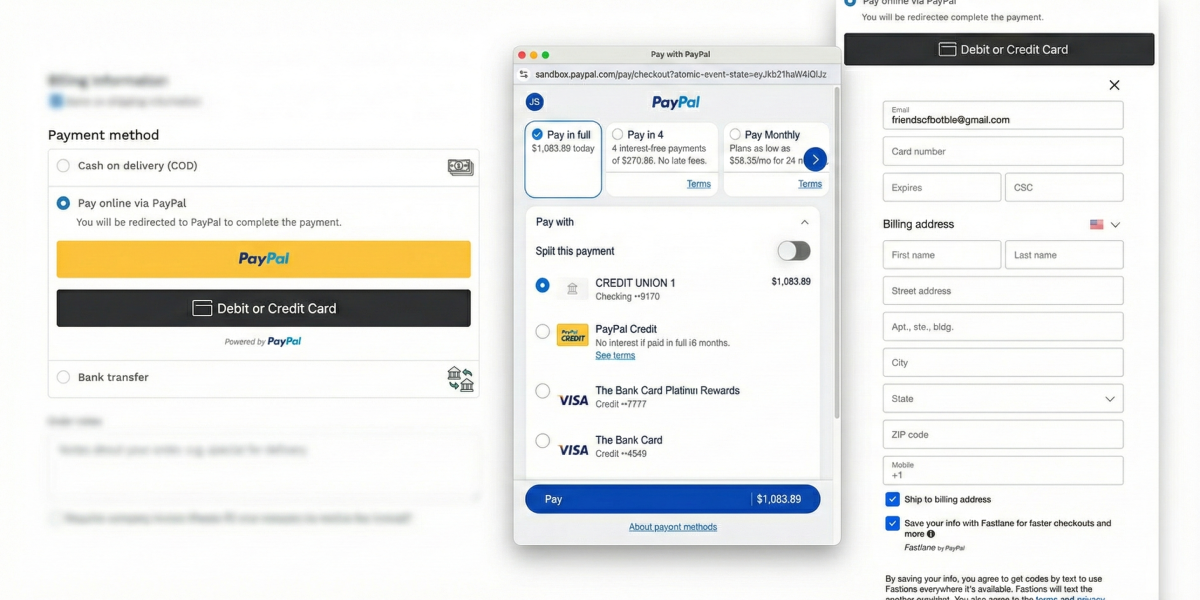
FOB PayPal Pro
PluginFOB PayPal Pro
A modern PayPal payment plugin for Botble CMS that integrates PayPal Smart Buttons for seamless inline checkout, webhook support for real-time payment updates, and customizable button styling options.
Requirements
- Botble core 7.3.0 or higher.
- PHP 8.2 or higher.
- Payment plugin activated.
Installation
Install via Admin Panel
Go to the Admin Panel and click on the Plugins tab. Click on the "Add new" button, find the FOB PayPal Pro plugin and click on the "Install" button.
Install manually
- Download the plugin from the Botble Marketplace.
- Extract the downloaded file and upload the extracted folder to the
platform/pluginsdirectory. - Go to Admin > Plugins and click on the Activate button.
Features
- Smart Buttons: Inline PayPal checkout without leaving your site (popup experience)
- Webhook Support: Real-time payment status updates for reliable order processing
- Customizable Buttons: Configure layout, color, shape, and label to match your brand
- Multi-currency Support: All PayPal-supported currencies with auto USD conversion fallback
- Refund Support: Full and partial refunds directly from the admin panel
- Secure Processing: Server-side order creation with client-side button rendering
- Payment Details: View PayPal transaction details in admin order page
Usage
For Store Administrators
- Navigate to Admin > Settings > Payment Methods
- Find PayPal and click to expand settings
- Enter your PayPal API credentials (Client ID and Client Secret)
- Configure button appearance options
- Enable the payment method
For Customers
- Add products to cart and proceed to checkout
- Select "Pay online via PayPal" as payment method
- Click the PayPal button or "Debit or Credit Card"
- Complete payment in the PayPal popup
- Automatically redirected to order confirmation
Configuration Options
Access settings at Admin > Settings > Payment Methods > PayPal:
- Client ID: Your PayPal application client ID
- Client Secret: Your PayPal application secret key
- Live Mode: Toggle between sandbox and production
- Button Layout: Vertical or Horizontal arrangement
- Button Color: Gold, Blue, Silver, White, or Black
- Button Shape: Rectangle or Pill
- Button Label: PayPal, Checkout, Buy Now, or Pay
- Webhook ID: Optional webhook signature verification
Webhook Setup (Optional)
- Go to PayPal Developer Dashboard
- Select your application and navigate to Webhooks
- Add webhook URL:
https://yoursite.com/payment/fob-paypal-pro/webhook - Select events:
PAYMENT.CAPTURE.COMPLETED,PAYMENT.CAPTURE.DENIED,PAYMENT.CAPTURE.REFUNDED - Copy Webhook ID to plugin settings
Screenshots


Comparison with botble/paypal
| Feature | botble/paypal | FOB PayPal Pro |
|---|---|---|
| Checkout Flow | Redirect to PayPal | Inline Smart Buttons |
| User Experience | Leaves site → PayPal → Returns | Stays on site (popup) |
| Webhook Support | No | Yes |
| Button Customization | No | Layout, color, shape, label |
| SDK | PHP (paypal-checkout-sdk) | JavaScript (PayPal JS SDK) |
| Payment Capture | On return callback | Immediate via AJAX |
When to Use Each
Use botble/paypal when:
- Simpler integration preferred
- No need for inline checkout
- Existing site works with redirects
Use FOB PayPal Pro when:
- Better UX is priority (no redirects)
- Need button styling options
- Want webhook reliability
- Modern checkout experience
The main advantage of FOB PayPal Pro is the inline checkout - customers never leave your site, reducing cart abandonment.
Contributing
Please see CONTRIBUTING for details.
Bug Reports
If you discover a bug in this plugin, please create an issue.
Security
If you discover any security related issues, please email [email protected] instead of using the issue tracker.
Credits
License
The MIT License (MIT). Please see License File for more information.
Support the Author
If you find this product helpful, consider supporting the developer.
Leave a comment
Your email address will not be published. Required fields are marked *

Hi Could you add Google pay and apple Pay ?

This is outstanding stuff, I've waited the longest to get this installed for my store, your work is truly remarkable.
I sent out a modest contribution your way today, & do hope more people who benefit from your great work will continually do the same.
Now one last request, could you make this plugin app incorporate the "Show More option" tab, which is found on the latest release Paypal advance Pro intregation plugin. The newer intregation contains additional payment option tabs like: Apple Pay, Google Pay, Venmo & etc...

Hi,
Thanks for reaching out about the "Show More option" feature from PayPal's latest Advanced Pro integration.
What this feature includes:
- Venmo (US only)
- Pay Later / Pay in 4
- Apple Pay
- Google Pay
- Regional payment methods (iDEAL, BLIK, Sofort, etc.)
Implementation details:
- Venmo + Pay Later – Straightforward to add (SDK configuration changes)
- Apple Pay / Google Pay – More complex, requires additional setup on your PayPal Business account and domain verification on your website
Before we proceed, please confirm:
1. Is your store primarily serving US customers? (Venmo is US-only)
2. Do you have Apple Pay / Google Pay enabled in your PayPal Business account settings?
3. Which specific payment methods are the highest priority for you?
Once you provide these details, we can give you a more accurate timeline and proceed with the implementation.