Laravel PHP Licenser & Updates Manager - REST API, webhooks, customer portal
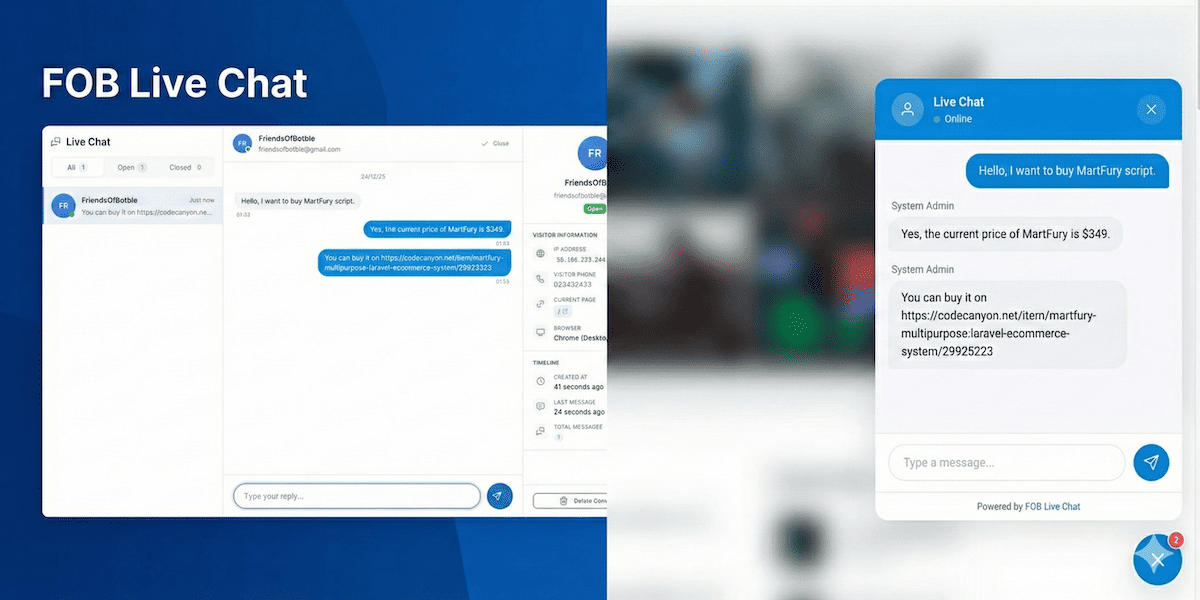
FOB LiveChat
PluginFOB Live Chat
This plugin adds a floating live chat widget to your website for real-time visitor support.
Requirements
- Botble core 7.3.0 or higher.
Installation
Install via Admin Panel
Go to the Admin Panel and click on the Plugins tab. Click on the "Add new" button, find the FOB Live Chat plugin and click on the "Install" button.
Install manually
- Download the plugin from the Botble Marketplace.
- Extract the downloaded file and upload the extracted folder to the
platform/pluginsdirectory. - Go to Admin > Plugins and click on the Activate button.
Screenshots
Chat Widget


Admin Panel

Settings


Changelog
Please see CHANGELOG for more information what has changed recently.
Contributing
Please see CONTRIBUTING for details.
Security
If you discover any security related issues, please email [email protected] instead of using the issue tracker.
Credits
License
The MIT License (MIT). Please see License File for more information.
Support the Author
If you find this product helpful, consider supporting the developer.
Leave a comment
Your email address will not be published. Required fields are marked *

Hi, really nice plugin feature you've brought to the market.
I have two issues needing help with.
First, how do I remove the hypertext url redirecting link I'm seeing on the bottom window box text showing: "Powered By FOB"?
Lastly, how do I manage raising & lowering Widget position on the screen & also making it smaller, as it seems to only stick to the bottom right corner, despite there being a tab option to auto locate it elsewhere.

Hi,
1. For "Powered by FOB Live Chat" text, this is a free plugin, so we want to keep it in the widget. If you want to remove it, you can remove it from source code in platform/plugins/fob-live-chat/resources/views/widget.blade.php
2. You can change it in Settings -> Live Chat (Offset X). Just change it to 120 or higher.

The plugin shows Online status all time. Will be nice to add a featured to change the status. Regards.
Try to update our plugin to version 1.0.2 in Plugins -> Installed plugins, then you will have option to change online status, or set working time for this https://prnt.sc/rsnzMgWxo7_C

good job, brother
Thank you.